Types of Software Testing Every QA Beginner Should Know
In 2023, a buggy software update wiped out 1.7 million files from a major cloud storage provider. In Nepal, a popular mobile banking app crashed during Tihar, blocking thousands of transactions for three hours. The cost was not just financial. Users lost trust, the company issued a public apology, and the development team spent two weeks in emergency fix mode.
Both failures had one thing in common: the software shipped without proper testing.
If you are studying software development, getting into QA, or simply trying to understand what "software testing" actually covers, this guide lays it all out clearly. There are more types of software testing than most beginners expect, and each one serves a different purpose. Understanding which type catches which problem, and when to run it, is the foundation of good QA practice and a core skill you build in any serious quality assurance course in Nepal.
What is Software Testing and Why Does It Matter in the SDLC?
Software testing is the process of evaluating an application to check that it works correctly, performs well, and meets the requirements it was built for. The International Software Testing Qualifications Board defines it as "the process of executing a program with the intent of finding errors."
But testing is more than just finding bugs. In a healthy software development lifecycle (SDLC), testing runs from the moment requirements are written to the day a feature ships to users. It answers two essential questions:
- Verification: Are we building the product correctly?
- Validation: Are we building the correct product?
A 2022 Consortium for IT Software Quality report found that poor software quality cost US organisations $2.41 trillion in a single year. The global software testing market is on track to cross $50 billion by 2026, which shows how seriously companies now treat this discipline.
At the highest level, all types of software testing fall into two major categories: functional testing and non-functional testing. Everything else branches out from there.
Functional Testing: Does the Software Do What It Should?
Functional testing verifies that every feature of the software works according to the requirements. It checks inputs, outputs, user workflows, and business logic. If the requirement says "users should receive an OTP within 30 seconds," functional testing confirms that this actually happens.
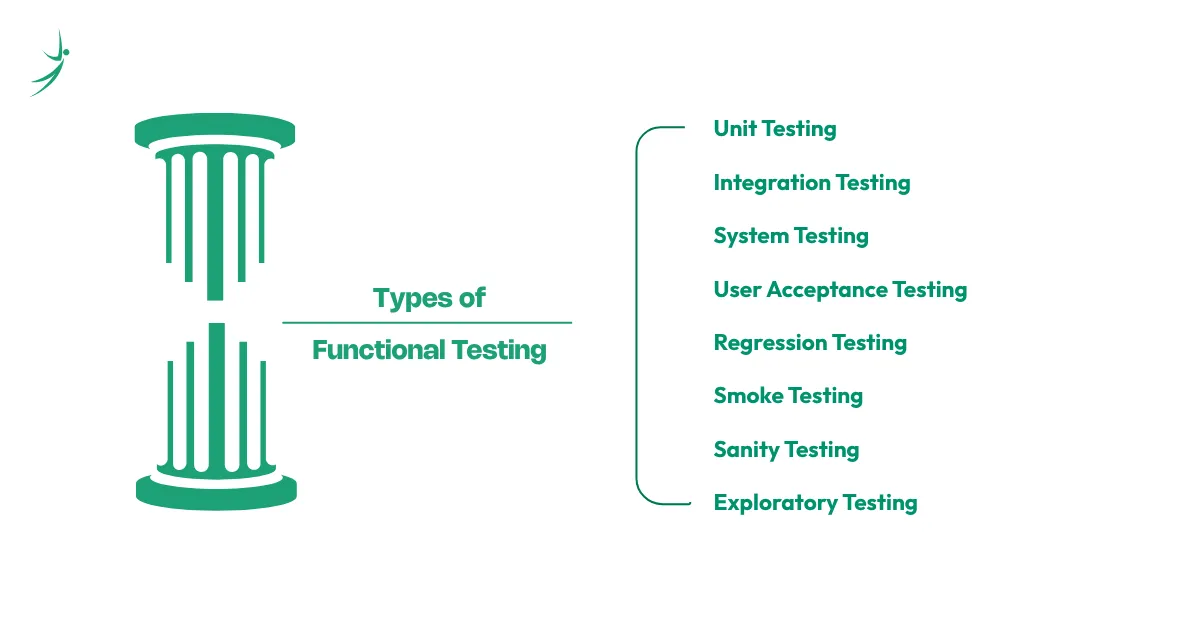
Here is a breakdown of the most important functional testing types.
1. Unit Testing
Unit testing checks the smallest pieces of code in isolation. A unit is typically a single function or method. Developers write unit tests to confirm that each piece of code does exactly what it is designed to do, before it gets combined with anything else.
Think of it like testing a single brick before you use it to build a wall.
Example: A function that calculates a 10% discount on a price gets unit-tested with multiple input values. Does it return the correct output for NPR 500? For NPR 0? For a negative number?
Tools: JUnit (Java), PyTest (Python), NUnit (.NET), Jest (JavaScript)
When to use it: During development. Developers write and run unit tests while writing code. They catch logic errors early, when fixing them takes minutes rather than days.
2. Integration Testing
Integration testing checks how different modules work together. You can have two units that pass all their individual tests and still break when they interact. Integration testing catches those interface problems.
Example: The login module passes its unit tests. The user profile module passes its unit tests. Integration testing checks whether the login module correctly passes the authenticated user's ID to the profile module.
Tools: Postman (API integration), TestNG, JUnit, REST Assured
When to use it: After unit testing is complete, when combining two or more modules for the first time.
3. System Testing
System testing evaluates the entire, fully integrated application against its specifications. It is the first point in the testing process where QA tests the product as a whole, the way a real user would experience it.
Example: A tester runs through a complete e-commerce workflow on eSewa: browse products, add to cart, enter payment details, confirm purchase, receive confirmation email. Every step of that end-to-end flow is verified.
Tools: Selenium, Cypress, TestRail, JIRA
When to use it: After all modules are integrated and ready for end-to-end validation, before the product goes to the business or client for acceptance.
4. User Acceptance Testing (UAT)
UAT is the final stage of testing before a product goes live. Business stakeholders or real end users run the application against the agreed business requirements. The question being answered is not just "does it work?" but "does it work the way we actually need it to work?"
Example: A bank's internal team uses the new loan application system for a week before it launches to customers. They check that every business workflow matches what was agreed in the requirements document.
Tools: JIRA, TestRail, Zephyr, or simple spreadsheet-based test scripts
When to use it: After system testing passes, as the final sign-off before production release.
UAT vs System Testing:
| System Testing | UAT | |
|---|---|---|
| Done by | QA team | Business users / clients |
| Focus | Technical requirements | Business requirements |
| Environment | Staging/test environment | UAT environment (near-production) |
| Goal | Find technical defects | Confirm business fitness |
| Stage | Before UAT | Last step before go-live |
5. Regression Testing
Every time a developer changes the code, there is a risk that the change breaks something that was already working. Regression testing re-runs a set of tests on the existing features after any code change to confirm nothing broke.
Example: A developer fixes a bug in the payment module. Regression testing re-runs all the tests for checkout, order history, email notifications, and account balance to confirm none of those features got affected.
Tools: Selenium, Cypress, TestNG, Jenkins (for automated regression in CI/CD)
When to use it: After every code change, bug fix, or new feature merge. In Agile teams, regression testing runs at the end of every sprint.
6. Smoke Testing
Smoke testing is a quick check to confirm that the most critical functions of a build work before spending time on deeper testing. The name comes from hardware testing: engineers would power on a circuit board and check if any smoke appeared before running full diagnostics.
Example: After a new build is deployed to the test environment, smoke testing verifies: can users log in? Can they navigate to the main dashboard? Does the checkout page load? If any of these core checks fail, the build gets rejected and sent back to development without wasting QA time on detailed testing.
Tools: Manual test scripts, Selenium smoke test suites
When to use it: Every time a new build arrives in the test environment, before starting any detailed test execution.
7. Sanity Testing
Sanity testing is a focused check on a specific feature after a bug fix or minor change. Unlike regression testing, which re-runs the full test suite, sanity testing zooms in on the area that changed.
Smoke vs Sanity: The key difference:
| Smoke Testing | Sanity Testing | |
|---|---|---|
| Scope | Entire application, core features | Specific feature or bug fix |
| When | After every new build | After a bug fix or small change |
| Depth | Surface-level, quick | Narrow but slightly deeper |
| Goal | Is the build stable enough to test? | Did this specific fix work? |
When to use it: After a developer fixes a specific defect and resubmits the build for retesting.
8. Exploratory Testing
Exploratory testing has no predefined test cases. The tester explores the application freely, using their knowledge, intuition, and experience to find problems that scripted tests miss. It is less about following a checklist and more about thinking the way a creative, unpredictable user might.
Example: A tester on a food delivery app in Nepal tries to order from a restaurant that is closed, places an order with an expired card, submits an address with only emoji characters, and logs in from two devices simultaneously. None of these scenarios were in the original test plan.
When to use it: When you have a new feature, a newly integrated system, or any time you want to catch edge cases that scripted tests would not cover.
Non-Functional Testing: How Well Does the Software Perform?
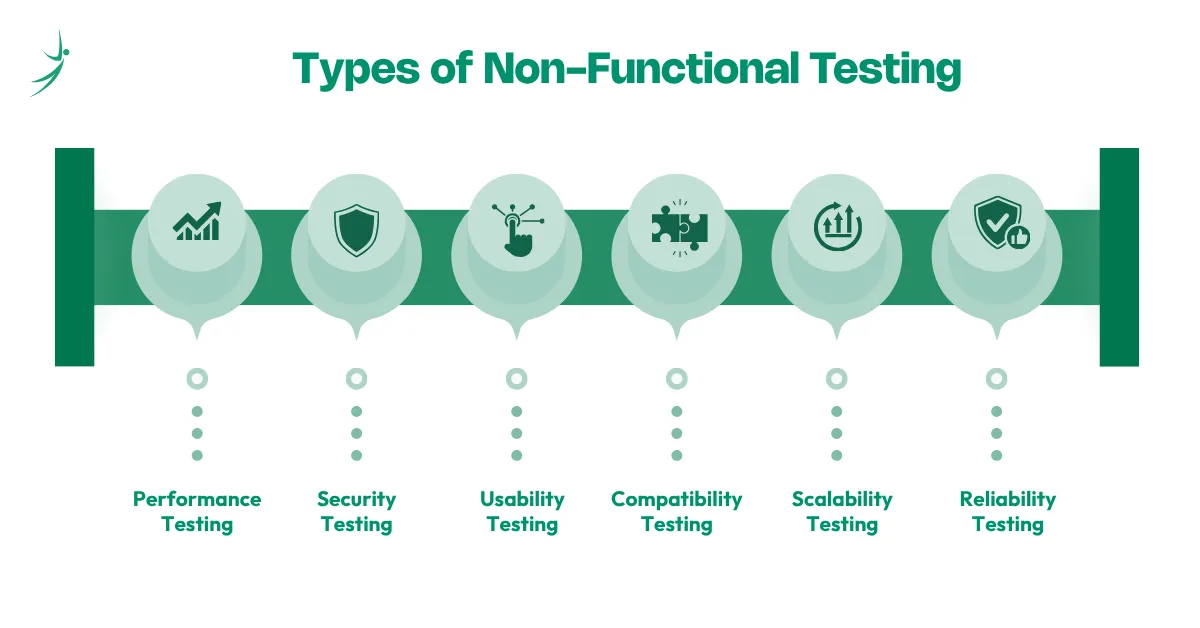
Non-functional testing evaluates the quality attributes of the software: speed, security, usability, compatibility, and reliability. A feature can work perfectly and still fail because it takes 10 seconds to load, crashes under traffic, or exposes user data to attackers.
1. Performance Testing
Performance testing measures how an application behaves under various load conditions. It is not a single test but a family of related tests, each probing a different stress scenario.
Load Testing
Load testing checks how the system performs under expected, normal usage. It answers: can the system handle the number of users we expect on a typical day?
Example: A Kathmandu-based fintech company expects 5,000 concurrent users on a regular day. Load testing simulates exactly that and checks response times, throughput, and error rates.
Stress Testing
Stress testing pushes the system well beyond its normal operating capacity to find its breaking point. It answers: what happens when we get twice, three times, or ten times the expected traffic?
Example: Khalti stress-tests its payment infrastructure before Dashain to understand exactly at what traffic level the system starts degrading or failing.
Spike Testing
Spike testing checks how the system handles sudden, sharp bursts of traffic. Unlike stress testing, which gradually increases load, spike testing hits the system with a massive jump all at once.
Example: A news portal in Nepal runs spike testing to simulate what happens when a breaking national news story sends 100,000 users to the site in 60 seconds.
Endurance (Soak) Testing
Endurance testing runs the application under a normal load for an extended period, typically hours or days. It finds memory leaks and performance degradation that only appear over time.
Example: A hospital management system runs 48-hour endurance testing to confirm it does not slow down or crash after processing continuous data for two full days.
Tools: Apache JMeter, k6, Gatling, LoadRunner
When to use it: Before major releases, before peak traffic events (festivals, sales), and for any system where downtime has real financial or safety consequences.
2. Security Testing
Security testing identifies vulnerabilities in the application that an attacker could exploit. Given that Nepal's fintech and outsourcing sectors handle sensitive financial and personal data, security testing has become a non-negotiable part of the QA pipeline.
Static Application Security Testing (SAST)
SAST analyzes the source code without executing the application. It finds insecure coding patterns, hardcoded credentials, and known vulnerability patterns directly in the code.
Tools: SonarQube, Checkmarx, Semgrep
Dynamic Application Security Testing (DAST)
DAST tests the running application by sending it malicious inputs and checking its responses. Unlike SAST, it does not need access to the source code.
Tools: OWASP ZAP, Burp Suite
Penetration Testing
Penetration testing, or pen testing, is a structured ethical hacking exercise where a security professional attempts to break into the application using real attack techniques. It gives the most realistic picture of what an actual attacker could do.
When to use it: Before any product launch, after major code changes, and as a regular audit for applications that handle payments or personal data.
3. Usability Testing
Usability testing checks whether real users can use the application easily and intuitively. It is less about catching bugs and more about identifying friction points that make the product frustrating to use.
Example: A Nepali EdTech platform watches five students try to enroll in a course without any instructions. Wherever they get confused, click the wrong button, or give up, that is a usability problem.
When to use it: During product design and after each major UI change, ideally with real users from the target audience.
4. Compatibility Testing
Compatibility testing checks that the application works correctly across different browsers, devices, operating systems, and screen sizes.
Example: A web application gets tested on Chrome, Firefox, Safari, and Edge on desktop, and on Chrome and Samsung Internet on Android phones. Given that Nepal is an Android-dominant market, mobile compatibility testing across mid-range Android devices is particularly important.
When to use it: Before every release, especially when the target audience uses a wide range of devices and browsers.
5. Scalability Testing
Scalability testing checks whether the system can grow to handle increased demand, whether that means more users, more data, or more transactions.
Example: A startup builds a team collaboration tool for 500 users and scalability-tests whether the architecture can support 5,000 or 50,000 users if the product takes off.
When to use it: During architecture planning and before major growth milestones.
6. Reliability Testing
Reliability testing checks how consistently the application performs its functions over a period of time. A reliable system produces the same correct output under the same conditions every time.
When to use it: For systems where consistency matters more than raw performance, like healthcare platforms, banking systems, or any application where the same operation must produce the same result every time.
Black Box, White Box and Grey Box Testing
These three testing approaches describe the level of access the tester has to the internal code of the application.
Black Box Testing
In black box testing, the tester knows nothing about the internal code. They interact with the application only through its interface, exactly the way a real user would. The tester provides inputs and checks outputs without any knowledge of how the system processes them.
Best for: Functional testing, UAT, system testing. Any testing that validates user-facing behavior.
White Box Testing
In white box testing, the tester has full access to the source code, architecture, and internal logic. Tests are designed around the internal structure of the application, not just its external behavior.
Best for: Unit testing, integration testing, security testing (SAST). Any testing where you need to check code paths, data flows, or logic branches.
Grey Box Testing
Grey box testing combines both approaches. The tester has partial knowledge of the internal structure. This is common in API testing, where the tester knows the API contract (what endpoints exist, what they expect, what they return) but does not have access to the database or server-side code.
Best for: API testing, integration testing, penetration testing.
| Black Box | White Box | Grey Box | |
|---|---|---|---|
| Code access | None | Full | Partial |
| Focus | External behavior | Internal logic | Mixed |
| Done by | QA testers | Developers / QA | QA / Security engineers |
| Best for | Functional, UAT, system | Unit, integration, SAST | API, integration, pen testing |
| Knowledge needed | Requirements only | Code, architecture | API contracts, partial architecture |
Modern Testing Trends in 2026
Software testing is not static. The tools, approaches, and philosophies around quality have changed significantly in the last few years. Here is what matters right now.
AI-Powered Testing
AI tools now auto-generate test cases from user behavior, detect flaky tests, and maintain automation scripts through UI changes. Platforms like Testim and Mabl use machine learning to build self-healing test suites that update themselves when the application changes. This cuts the time QA engineers spend on test maintenance significantly.
The World Quality Report 2025 found that 58% of enterprises are already using AI tools in their QA process. AI does not replace QA engineers. It eliminates the repetitive parts of the job and lets engineers focus on strategy, edge case analysis, and exploratory testing.
Shift-Left Testing
Shift-left means moving testing earlier in the development process. Instead of testing after development is complete, QA gets involved at the requirements stage. QA engineers review user stories for ambiguity before developers write a line of code. Unit tests are written alongside code. Integration tests run automatically on every code commit.
The result is fewer bugs in later stages and significantly lower cost to fix the ones that do appear.
Shift-Right Testing
Shift-right is the opposite. It means testing in production, with real users and real data. Techniques like A/B testing, canary releases, feature flags, and real-user monitoring give QA engineers visibility into how the software actually behaves in the hands of real users at scale. No staging environment can fully replicate production traffic.
Continuous Testing in CI/CD Pipelines
In modern Agile and DevOps teams, tests run automatically every time a developer pushes code. The CI/CD pipeline triggers a test suite, and the build only moves forward if the tests pass. This gives developers instant feedback on whether their change broke anything.
Tools: Jenkins, GitHub Actions, GitLab CI, CircleCI
Chaos Engineering
Chaos engineering deliberately injects failures into a running system to test its resilience. Teams intentionally shut down servers, introduce network latency, or corrupt data to see how the system responds and recovers. Netflix famously built this practice into their production infrastructure.
In Nepal's growing SaaS sector, chaos engineering is still emerging, but outsourcing companies building for international clients are already adopting it.
Accessibility Testing
Accessibility testing checks that the application works for users with disabilities: people who use screen readers, keyboard-only navigation, or require high-contrast displays. International standards like WCAG 2.2 define the benchmarks. For any product targeting international markets or government sectors, accessibility testing is increasingly mandatory.
Tools: Axe, Lighthouse, NVDA screen reader
How to Choose the Right Testing Type
With so many types of software testing available, the practical question is: which ones do you actually run, and when?
The answer depends on three things: what you are building, what stage of development you are in, and what risk you are trying to manage.
Stage-Wise Testing Guide
| SDLC Stage | Recommended Testing Types |
|---|---|
| Requirements & Design | Review-based QA, requirement analysis, accessibility review |
| Development | Unit testing, static code analysis (SAST), code reviews |
| Integration | Integration testing, API testing, smoke testing |
| System | System testing, regression testing, performance testing |
| Pre-Release | UAT, sanity testing, compatibility testing, security testing (DAST, pen test) |
| Post-Release | Monitoring, shift-right testing, chaos engineering, exploratory testing |
Recommended Testing Stack by Project Type
- For a web application: Start with unit and integration tests in the CI pipeline. Add Selenium or Cypress for end-to-end system testing. Run JMeter for load testing. Use OWASP ZAP for security scanning. Finish with UAT before go-live.
- For a mobile application: Use Appium for functional automation across Android and iOS. Add compatibility testing across device sizes. Run Appium with performance hooks for mobile-specific load testing. Conduct usability testing with real users on mid-range Android devices, given Nepal's device landscape.
- For an API: Postman handles functional and integration testing. Newman (Postman CLI) integrates into the CI pipeline for automated regression. k6 handles API performance and load testing. Use OWASP ZAP for API security scanning.
Manual Testing vs Automation Testing: A Quick Comparison
You will hear these terms constantly as you enter QA. They are not types of testing on their own but approaches that apply across all the types above.
- Manual testing means a human tester executes test cases by hand, interacting with the application exactly as a user would. It is essential for exploratory testing, usability testing, UAT, and any scenario where human judgment matters more than speed.
- Automation testing means writing code scripts that execute test cases automatically. It is essential for regression testing, load testing, and any repetitive test that needs to run on every build.
The right answer is almost always both. Manual testing catches what automation misses. Automation handles the volume that manual testing cannot sustain. Our guide on manual testing vs automation testing gives you a detail on how each work.
QA Career and Software Testing Jobs in Nepal
Understanding the types of software testing is not just academic knowledge. Each testing type maps to a real skill that Nepal's IT companies actively hire for. If you are figuring out where to start, the scope of QA guide breaks down the exact path from fresher to employed, with the tools and skills you need at each stage.
Fintech companies like F1Soft, eSewa, and Khalti need QA engineers who can run regression suites and performance tests on transaction-heavy systems. Software outsourcing firms like Leapfrog Technology and Cotiviti need automation engineers who build Selenium and Cypress frameworks for international client projects. Security-focused organizations need QA engineers with Postman, OWASP ZAP, and pen testing skills.
As of June 2026, LinkedIn Nepal lists over 66 active QA job openings. Manual QA testers start at NPR 25,000 to 50,000 per month. Automation engineers with Selenium and Postman skills earn NPR 60,000 to 150,000+ per month. Senior QA engineers with CI/CD and performance testing experience push well above that range.
Conclusion
There is no single "software testing." There are dozens of distinct types, each designed to catch a specific category of problem at a specific stage of development. Functional tests catch broken features. Non-functional tests catch slow, insecure, or unstable software. Black box testing validates what users experience. White box testing validates what developers write. Modern practices like shift-left, continuous testing, and AI-powered tools make all of it faster and more reliable.
The best QA engineers do not just run tests. They understand why each type of test exists, what it is designed to catch, and how to build a testing strategy that covers the right risks for their specific product.
If you want to build these skills practically with real projects, tool-based labs, and mentorship from engineers working in Nepal's IT industry, explore Skill Shikshya's Quality Assurance course. You will work with JIRA, Selenium, Postman, and JMeter on real codebases and graduate with a portfolio that Nepal's top IT companies look for.
Frequently Asked Questions
How many types of software testing are there?
Which type of software testing comes first?
What is the difference between UAT and system testing?
What is regression testing and why does it matter?
When should you use automation testing instead of manual testing?
What is the difference between smoke testing and sanity testing?
What is grey box testing?
About Author:

Ms. Sarina Byanjankar is an Associate QA Lead at ITONICS and a dedicated QA Mentor with over five years of experience in driving software excellence. She is passionate about the art of quality assurance, specializing in seamless manual, automation, and API testing to ensure that digital products perform flawlessly across web and mobile platforms.
With a deep technical background in Selenium, Katalon Studio, and Agile methodologies, Ms. Byanjankar has a proven track record of optimizing software performance, including implementing frameworks that reduce testing time by 40%. She enjoys mentoring aspiring engineers to develop a sharp analytical mindset, teaching them how to bridge the gap between technical testing and collaborative communication to deliver truly high-quality user experiences.