Kubernetes for Beginners: A Complete Guide to K8s, Clusters and Container Orchestration
You finally got Docker working. Containers are running. Images are building cleanly. You push your app to a server and it just works, no "missing dependency" errors, no environment mismatches.
Then your team says, "Great. Now we need to deploy this across 50 servers, scale it automatically during traffic spikes, and restart it if it ever crashes."
Suddenly, Docker alone is not enough.
That is exactly the gap Kubernetes fills. It takes everything you built with Docker and makes it production-ready; automated, scalable, and self-healing across as many servers as you need.
In this guide, you will learn what Kubernetes is, how it works under the hood, the core concepts every beginner needs to know, how it compares to Docker, and how to start learning it for a real DevOps career in 2026.
What Is Kubernetes?
Kubernetes. also written as K8s (there are 8 letters between the K and the s), is an open-source platform that automates the deployment, scaling, and management of containerized applications.
Google originally built it to manage their own massive infrastructure. In 2014, they open-sourced it. Today, the Cloud Native Computing Foundation (CNCF) maintains it, and it has become the industry standard for running containers at scale.
Here is a simple way to think about it: Docker is a shipping container. It packs your app and everything it needs into one portable unit. Kubernetes is the port, the system that decides where each container goes, monitors them around the clock, replaces damaged ones, and routes traffic to healthy ones.
According to CNCF data, around 96% of organizations are either using or evaluating Kubernetes. It is not a niche tool. It is the default choice for teams that run containers in production.
In plain terms, Kubernetes:
- Automatically deploys your containers across multiple servers
- Restarts failed containers without anyone touching a keyboard
- Scales your application up when traffic increases and down when it drops
- Balances incoming traffic across healthy instances
- Lets you update your app without taking it offline
The people who use it day-to-day are DevOps engineers, cloud architects, platform engineers, and site reliability engineers (SREs). If you are aiming for any of those roles, Kubernetes is not optional, it sits right at the core of the DevOps learning path.
Why Do You Need Kubernetes?
If you are running three or four containers on a single server, you do not need Kubernetes. You can manage that yourself.
But modern applications do not work that way. A typical production app might have separate containers for the frontend, the backend API, the database, a cache layer, a background job runner, and a logging service. Each of those needs to stay running, stay connected to the others, and handle real traffic across multiple servers, around the clock.
Before container orchestration tools existed, teams handled this with custom scripts. One script to deploy. Another to check if things were still running. Another to restart a crashed service. Another to route traffic. These scripts were fragile, hard to maintain, and one bad deployment away from bringing everything down.
Kubernetes replaces all of that with a single, declarative system. Instead of writing scripts that say how to deploy, you write a configuration file that says what you want. You tell Kubernetes: "I want three copies of this API running at all times." Kubernetes figures out how to make that happen and it keeps making it happen, even when servers fail.
Here is what that buys you:
- Self-healing: If a container crashes, Kubernetes restarts it automatically. If a server goes down, Kubernetes moves the containers to a healthy server. You do not get a 3am alert because something fell over.
- Auto-scaling: When your app gets a traffic spike; say, a product launch or a viral post, Kubernetes adds more containers to handle the load. When traffic drops, it scales back down so you are not wasting money on idle servers.
- Zero-downtime deployments: You can push a new version of your app without taking it offline. Kubernetes replaces containers one at a time, keeping the old version running until the new one is confirmed healthy.
- Service discovery: Containers need to talk to each other. Kubernetes handles that networking automatically. Your backend does not need to know the exact IP address of your database, Kubernetes routes the traffic.
- Portability: A Kubernetes setup that runs on AWS works the same way on Google Cloud, Azure, or your own on-premise servers. You are not locked into one cloud provider.
If you want to understand how DevOps tools like Docker, Kubernetes, and Jenkins fit together in a real workflow, that guide covers the full picture.
Kubernetes vs Docker: What Is the Difference?
This is the question almost every beginner asks, and it is worth getting clear on before going any further.
Docker and Kubernetes are not competitors. They work together.
Docker's job is to build and run containers. You write a Dockerfile, build an image, and Docker starts the container. That is where Docker's responsibility ends.
Kubernetes' job is to manage those containers at scale across multiple servers, with automatic restart, scaling, and networking.
Think of it this way: Docker is the chef who cooks the dishes (containers). Kubernetes is the restaurant manager who decides which table gets served, how many chefs are needed during the dinner rush, and what happens when one chef calls in sick.
| What We Are Comparing | Docker | Kubernetes |
|---|---|---|
| Primary role | Build and run containers | Orchestrate containers at scale |
| Scope | Single host | Multiple nodes and clusters |
| Scaling | Manual | Automatic |
| Self-healing | No | Yes |
| Networking | Basic | Advanced (Services, Ingress) |
| Learning curve | Beginner-friendly | Moderate |
| Used with | Kubernetes, CI/CD tools | Docker or other container runtimes |
The key takeaway: you learn Docker first, then Kubernetes. They build on each other. If you have not gone through Docker yet, start with our Docker for Beginners guide before continuing here.
Core Kubernetes Concepts: The Building Blocks
This is the part that trips up most beginners, not because it is genuinely hard, but because there are a handful of new terms that all need to click into place at once.
Work through each one below. By the end of this section, you will have a mental model that makes the rest of Kubernetes make sense.
Cluster
A Kubernetes cluster is a group of machines that Kubernetes manages as one unified system.
The important shift in thinking here: you stop thinking about individual servers and start thinking about your application. You tell Kubernetes what you need, how many copies of your app, how much memory, what ports to expose and Kubernetes figures out which machines to use. It does not matter if you have three servers or three hundred. Kubernetes scales the same way.
Node
A node is a single machine inside the cluster. It can be a physical server or a virtual machine running in the cloud.
There are two types of nodes:
- Control Plane Node, the brain: It makes decisions about the cluster: what runs, where it runs, and what to do when something goes wrong.
- Worker Nodes, the muscle: These are the machines that actually run your application containers.
In a small setup, you might have one control plane node and two or three worker nodes. In a large production cluster, you might have dozens of worker nodes.
Control Plane
The control plane is the management layer of your cluster. It watches the current state of the cluster, compares it to what you said you wanted, and takes action whenever there is a difference.
The control plane has four main components. You do not need to memorise all of them right now, but it helps to know what each one does:
- API Server: the front door. Every command you run goes through the API server first. Nothing happens in the cluster without it knowing.
- Scheduler: decides which worker node a new container should run on, based on available resources and your configuration.
- Controller Manager: watches the cluster continuously and acts as the enforcer. If you said "run three copies of this app" and one crashes, the Controller Manager notices and starts a replacement.
- etcd: the cluster's database. It stores every piece of configuration and state. If the control plane is the brain, etcd is the memory.
Pod
The Pod is the most important concept in Kubernetes. Everything else builds on it.
A Pod is the smallest deployable unit in Kubernetes. It wraps one or more containers and gives them a shared network and storage. If a container is an application, a Pod is the room it lives in.
Here is the critical thing beginners miss: Pods are ephemeral. They are created, destroyed, and replaced constantly. Do not think of a Pod as a permanent thing. Never write code that relies on a Pod having a fixed IP address or always being alive.
Pods are like cells in your body, they are constantly being created and replaced. You do not manage individual cells. You manage the system that keeps producing them. In Kubernetes, that system is called a Deployment.
Deployment
A Deployment is how you tell Kubernetes to run your application reliably.
Instead of starting a single Pod and hoping it stays up, you create a Deployment that says: "I want three copies of this Pod running at all times." Kubernetes creates those Pods, monitors them, and replaces any that crash automatically, without you doing anything.
A Deployment manages a ReplicaSet, which in turn manages the individual Pods. You almost never touch the ReplicaSet directly. You just talk to the Deployment.
Deployments are the standard way to run stateless applications in Kubernetes; web servers, APIs, background workers.
Service
Here is the problem: every time a Pod is created, it gets a new IP address. If your frontend needs to talk to your backend API, it cannot rely on a fixed IP, that IP changes every time a Pod restarts.
A Service solves this. It gives your application a stable network address that does not change, no matter how many times the underlying Pods restart or get replaced.
There are three common types of Services:
- ClusterIP, the default: The Service is only accessible inside the cluster. Use this for internal communication between your containers.
- NodePort: exposes your Service on a port on every node. Accessible from outside the cluster, but not ideal for production.
- LoadBalancer: creates a cloud load balancer (on AWS, GCP, Azure) and routes external traffic to your Service. This is what you use in production.
Namespace
A Namespace is a way to divide one cluster into separate logical sections.
Imagine your team uses one Kubernetes cluster for development, staging, and production. Without namespaces, all those environments would share the same space and potentially interfere with each other. With namespaces, you keep them clean and separate, production, staging, dev while still running on the same physical cluster.
For beginners, namespaces are not something you need to configure immediately. But you will encounter them quickly, so it is worth knowing what they are.
ConfigMap and Secret
These two handle configuration, the settings and credentials your application needs to run.
- A ConfigMap stores non-sensitive configuration: environment variables, config file contents, feature flags. You separate your configuration from your container image so you can change settings without rebuilding the image.
- A Secret stores sensitive data: passwords, API keys, database credentials. Kubernetes stores Secrets in encoded form and limits which Pods can access them.
How Kubernetes Works: The Control Loop
The core idea behind Kubernetes is simple once you see it.
You describe what you want, the desired state. Kubernetes watches what is actually happening, the current state. Whenever the two do not match, Kubernetes fixes it.
This is called the reconciliation loop, and it runs continuously.
Here is a concrete example:
- You create a Deployment that says "run three copies of my API"
- Kubernetes starts three Pods across your worker nodes
- One of your worker nodes loses power and goes offline
- Kubernetes detects that only two Pods are now running, that does not match the desired state of three
- Kubernetes automatically starts a new Pod on one of the remaining healthy nodes
- Three Pods are running again. Desired state restored. No one woke up at 3am.
This loop is always running. It is what makes Kubernetes self-healing by default.
The control plane handles this entire process, taking your desired state, deciding where to place Pods, restarting failed containers, and reacting when nodes go offline. The worker nodes just execute what they are told.
Kubernetes Architecture: How It All Fits Together
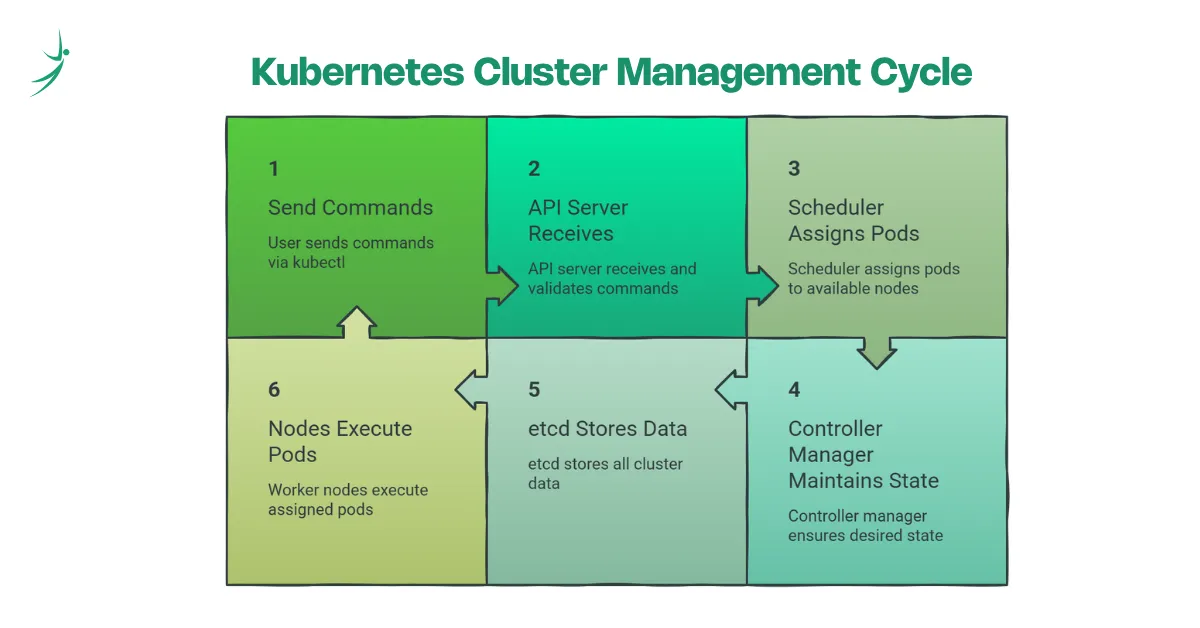
When you run a command like kubectl apply -f deployment.yaml, here is what happens:
- kubectl sends your request to the API Server
- The API Server stores the desired state in etcd
- The Controller Manager notices the desired state does not match the current state
- The Scheduler picks which worker node should run the new Pod
- The worker node pulls the container image and starts the Pod
- Kubernetes continuously monitors everything and reconciles any drift
The two-layer mental model to keep in mind: Control Plane = brains, Worker Nodes = muscle
If a worker node goes down, the control plane detects it, reschedules the Pods that were running on that node to healthy nodes, and restores the desired state. That self-healing happens automatically.
Kubernetes vs Other Orchestration Tools
Kubernetes is not the only container orchestration tool. Here is how it compares to the main alternatives:
| Tool | Best For | Who Manages It |
|---|---|---|
| Kubernetes | Industry standard; complex production workloads | CNCF / self-managed |
| Docker Swarm | Simple setups; smaller teams | Docker |
| AWS ECS | Teams fully committed to the AWS ecosystem | Amazon |
| HashiCorp Nomad | Lightweight workloads; mixed container and non-container | HashiCorp |
While all these tools solve container orchestration, Kubernetes is the preferred choice across the industry due to its massive community, ecosystem of tools, and support from every major cloud provider.
For a DevOps career, Kubernetes is the one worth learning first. The others are niche or platform-specific. Kubernetes is everywhere.
Is Kubernetes Worth Learning in 2026?
Short answer: yes. The longer answer explains why.
87% of organizations now deploy Kubernetes in hybrid-cloud environments. 82% plan to make it their primary application platform within the next five years. These are not small numbers. Kubernetes has already won the container orchestration market, and adoption is still growing.
Job roles that use Kubernetes directly include:
- DevOps Engineer: the most common entry point
- Cloud Engineer: managing infrastructure on AWS, GCP, or Azure
- Site Reliability Engineer (SRE): keeping production systems healthy and scalable
- Platform Engineer: building the internal developer platforms that teams use
- MLOps Engineer: deploying and managing machine learning models at scale
Kubernetes is also a prerequisite for several industry certifications:
- CKA: Certified Kubernetes Administrator
- CKAD: Certified Kubernetes Application Developer
- CKS: Certified Kubernetes Security Specialist
- AWS DevOps Professional: requires solid Kubernetes and container knowledge
In Nepal specifically, the IT industry is moving fast toward cloud-first infrastructure. Companies working with Indian and global clients increasingly expect DevOps engineers who can manage containerized deployments. Kubernetes knowledge is already a differentiator in the market and that gap will only widen over the next few years. If you want to see which programs are worth your time, we have a breakdown of the best DevOps courses in Nepal to help you choose.
If you want to work in DevOps, cloud engineering, or platform engineering, Kubernetes is not a nice-to-have skill. It is the foundation.
How to Get Started with Kubernetes: A Practical Learning Path
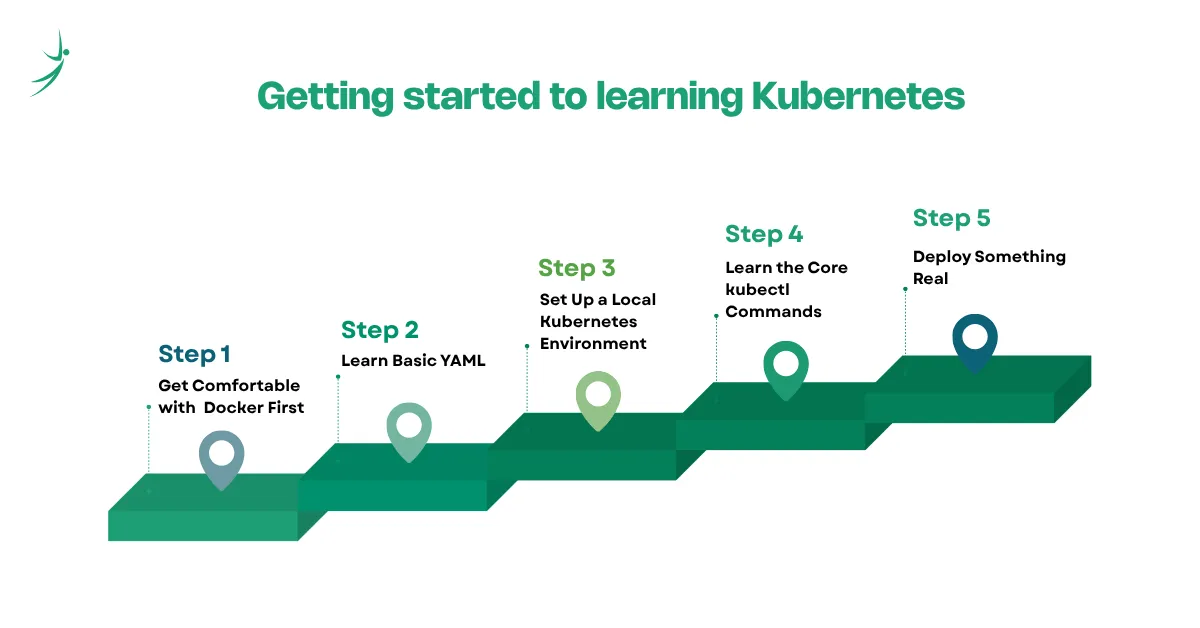
Here is a step-by-step path that actually works, not the "read the entire official documentation" approach, but the hands-on one.
Step 1: Get Comfortable with Docker First
Kubernetes manages containers. You need to understand what a container is, how images work, and how to run a basic Docker setup before Kubernetes will make sense.
If you have not done this yet, go through our Docker for Beginners guide first. It covers everything you need; containers, images, Docker Hub, and your first deployment.
Step 2: Learn Basic YAML
Kubernetes uses YAML files to define almost everything; Pods, Deployments, Services, ConfigMaps. You do not need to master YAML, but you need to be comfortable reading and writing it.
Here is what a simple Pod definition looks like:
apiVersion: v1
kind: Pod
metadata:
  name: my-app
spec:
  containers:
    - name: my-app
      image: nginx
      ports:
        - containerPort: 80
Read it out loud: "Create a Pod called my-app. It runs one container using the nginx image, and it listens on port 80." That is all it says. YAML is just structured configuration, once you get the pattern, it becomes easy to read.
Step 3: Set Up a Local Kubernetes Environment
You do not need AWS or Google Cloud to start learning Kubernetes. Run it on your own laptop first.
Three options for local setup:
- Minikube: the most beginner-friendly option. Run a single-node Kubernetes cluster on your local machine. Start here.
- Kind (Kubernetes in Docker): runs Kubernetes nodes as Docker containers. Great for testing multi-node setups locally.
- K3s: a lightweight Kubernetes distribution. Fast to install and runs well on low-resource machines.
Avoid jumping to managed cloud services like AWS EKS or Google GKE until you understand the fundamentals. Cloud setups add cost and complexity that will distract you from learning the core concepts.
Step 4: Learn the Core kubectl Commands
kubectl is the command-line tool you use to interact with Kubernetes. Every operation, deploying an app, checking what is running, reading logs, deleting a Pod goes through kubectl.
Here are the commands you will use most as a beginner:
| Command | What It Does |
|---|---|
| kubectl get pods | List all running Pods in the current namespace |
| kubectl get nodes | List all nodes in the cluster |
| kubectl apply -f file.yaml | Create or update resources from a YAML file |
| kubectl describe pod <name> | Show detailed information about a specific Pod |
| kubectl logs <pod-name> | View the logs from a container inside a Pod |
| kubectl delete pod <name> | Delete a specific Pod |
| kubectl get deployments | List all Deployments |
| kubectl scale deployment <name> --replicas=5 | Scale a Deployment to 5 replicas |
Run these commands as you learn each concept. Seeing the output in a live cluster makes each idea stick far faster than reading about it.
Step 5: Deploy Something Real
The best way to solidify what you have learned is to build something end-to-end. Here is a simple exercise:
- Write a Deployment YAML for an nginx web server with 3 replicas
- Apply it with kubectl apply -f
- Watch the Pods start with kubectl get pods
- Create a Service to expose it externally
- Delete one of the Pods manually and watch Kubernetes restart it automatically
- Scale the Deployment up to 5 replicas and watch the new Pods appear
That one exercise touches Deployments, ReplicaSets, Pods, Services, self-healing, and scaling. It is more valuable than reading three more articles.
Kubernetes Terms Cheat Sheet
Keep this as a reference while you are learning:
| Term | What It Means |
|---|---|
| K8s | Short for Kubernetes, 8 letters sit between the K and the s |
| Cluster | A group of machines managed together by Kubernetes |
| Node | A single machine (physical or virtual) inside the cluster |
| Pod | The smallest unit in Kubernetes; wraps one or more containers |
| Deployment | Manages a desired number of Pod replicas and keeps them running |
| ReplicaSet | Ensures the right number of identical Pods are running at all times |
| Service | Gives Pods a stable, permanent network address |
| Namespace | A logical boundary inside a cluster, separates environments or teams |
| kubectl | The command-line tool for interacting with Kubernetes |
| Control Plane | The brain of the cluster, handles scheduling, state, and decisions |
| etcd | The cluster's key-value database; stores all cluster state and config |
| Ingress | Routes external HTTP and HTTPS traffic to the right Services |
| ConfigMap | Stores non-sensitive app configuration (env vars, config files) |
| Secret | Stores sensitive data like passwords and API keys |
| YAML | The file format used to define all Kubernetes resources |
Final Thoughts
Remember where this guide started: a developer who got Docker working and then got asked to deploy across 50 servers, handle traffic spikes automatically, and never have downtime. That is not a scripting problem. That is an orchestration problem.
Kubernetes is the answer. You tell it what you want, and it makes it happen; deploying containers, restarting failures, scaling under load, and keeping your application running across as many machines as you need.
You now know what Kubernetes is, how it differs from Docker, what the core concepts mean (Pods, Deployments, Services, Nodes, the Control Plane), and how to start building real experience with it.
The next step is hands-on practice. Set up Minikube, deploy something, and break it deliberately; delete Pods, kill services, see how Kubernetes responds. That is where the concepts stop being abstract and start making sense.
If you want to go from Docker basics to deploying real applications on Kubernetes with CI/CD, cloud platforms, and everything in between, our DevOps and Cloud diploma program covers it all. It is hands-on, structured, and built around what Nepal's IT industry is actually hiring for in 2026.
Frequently Asked Questions
What is Kubernetes in simple terms?
Is Kubernetes the same as Docker?
Do I need to learn Docker before Kubernetes?
What is a Pod in Kubernetes?
What is the difference between a Pod and a Deployment?
What is kubectl?
Can Kubernetes run without Docker?
Is Kubernetes hard to learn?
How long does it take to learn Kubernetes?
What certifications are available for Kubernetes?
Is Kubernetes relevant in 2026?
About Author: