Top Bug Bounty Tools 2026: The Complete Toolkit by Workflow Stage
Recon alone makes up most of the actual work in bug bounty hunting, more than the exploitation itself, which is exactly why the tools that matter most in this field are not the flashy ones. Skill Shikshya's bug bounty and web application security training course builds hands-on labs around this exact toolkit rather than teaching tools in isolation, since knowing what a tool does means far less than knowing when to reach for it.
How This List Is Organized
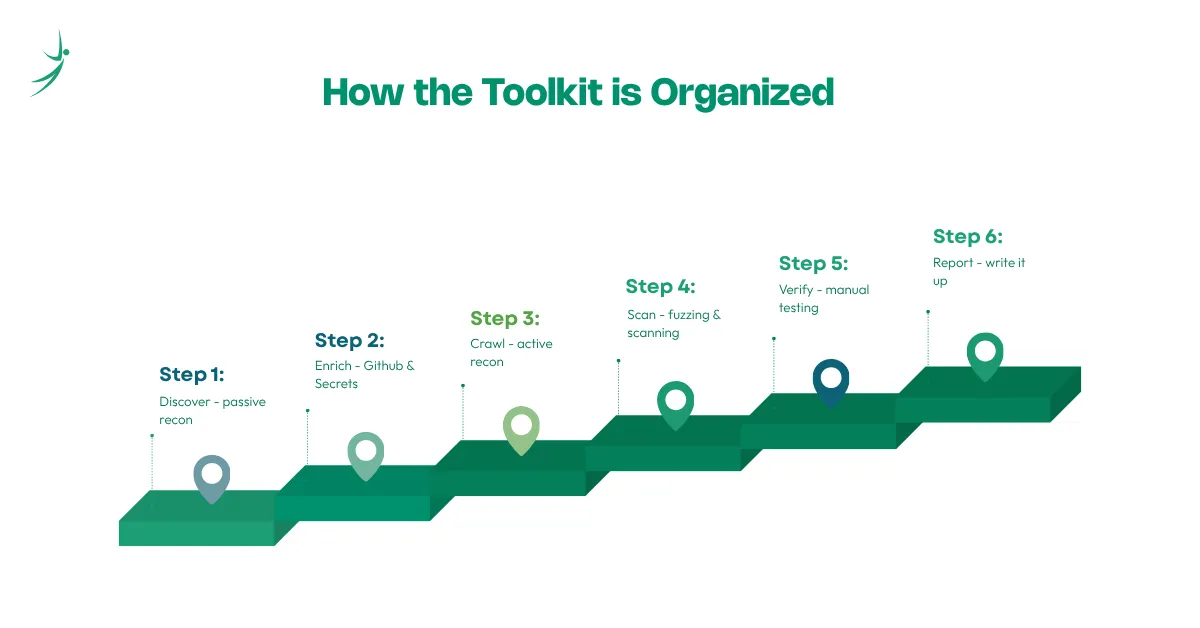
Recon is not one job. It is several separate jobs that each need different software: discover, enrich, crawl, scan, verify, and report. Treating it as one flat list of tools misses why hunters actually reach for a specific one at a specific stage, so this list follows that same order instead of ranking tools by popularity. For the bigger roadmap this toolkit fits into, the career guide on how to get into bug bounty covers where tool skills sit alongside everything else worth learning.
Passive Recon Tools
Passive recon means gathering information without ever touching the target directly, which keeps a hunter's footprint invisible during the earliest stage of testing:
- Subfinder: fast, passive subdomain enumeration built specifically to return valid subdomains quietly, from ProjectDiscovery's toolset
- OWASP Amass: a deeper, more comprehensive framework for mapping attack surface and external assets, useful when a target needs a thorough pass rather than a quick one
- Certificate transparency logs: reveal subdomains through the certificates issued for them, often turning up assets a company forgot existed
- Wayback Machine and gau: pull old and archived URLs, sometimes surfacing deprecated endpoints that still work
Subfinder and Amass solve related but different problems. Subfinder is built for breadth with low friction, a fast first pass, while Amass digs deeper and shows relationships between assets once the target looks worth the extra time.
A basic Subfinder run looks like this:
subfinder -d target.com -silentRunning that against a target with a broad scope often returns two or three times more subdomains than the main site links to publicly. A meaningful share of those turn out to be old staging environments or internal tools that were never meant to stay reachable, and that gap between what a company thinks is public and what actually is tends to be where the easiest first finds show up.
GitHub and Secrets Recon
This category gets skipped constantly, despite being one of the more reliable ways to find something real. Companies push code to GitHub, and API keys, tokens, and credentials end up in public repositories far more often than most people assume:
- GitHound: scans GitHub's Code Search API for exposed API keys, not limited to known repositories or organizations
- TruffleHog: scans for leaked secrets across repositories using pattern matching and entropy analysis
- SecretFinder: a Python tool focused specifically on finding sensitive data like API keys and tokens inside JavaScript files
Bug bounty automation genuinely earns its keep here, since manually reading through commit histories on a large target is not a realistic way to spend an afternoon. Leaked credentials also tend to open the door to the kind of authentication and access weaknesses covered in OWASP Top 10 Explained, which is often the actual payout once a leaked key gets tested rather than just reported on its own.
A common real-world pattern looks like this: a company's public repository has a three-year-old commit containing a hardcoded AWS access key, added during a debugging session and never removed. TruffleHog flags it in seconds:
trufflehog github --repo=https://github.com/target/repoThe key itself is not the finding. Whether it still works is. A surprising number of old, forgotten credentials stay valid for years because nobody rotates them after the repository goes public, which is exactly why this category keeps producing real results long after most hunters assume a target has already been picked clean.
Active Recon Tools
Active recon means interacting directly with the target, which trades stealth for detail:
- httpx: a fast HTTP toolkit for probing which hosts are actually alive and worth further attention
- Nmap: the standard for port scanning, identifying open ports and running services
- Gobuster: directory and file brute-forcing, useful for surfacing paths that were never linked anywhere
- EyeWitness and Aquatone: visual recon tools that screenshot large numbers of web endpoints at once, making it possible to skim hundreds of hosts quickly instead of opening each one by hand
Active recon should always follow passive recon, not replace it. Verifying what passive tools already found, confirming a port is actually open, for example, wastes far less time than starting active scanning blind. This is usually also the point where testing stops feeling like research and starts feeling like the hands-on process described in What Is Bug Bounty Hunting?
Chaining Subfinder straight into httpx is one of the most common patterns in this stage, since it turns a raw subdomain list into a list of confirmed, reachable targets in one step:
subfinder -d target.com -silent | httpx -silent -status-code -titleThat single line filters out dead subdomains immediately, so the rest of the workflow only spends time on hosts that actually respond.
Scanning and Fuzzing Tools
Once a target is mapped, this is where hunters start actively looking for something exploitable:
- Nuclei: a fast, template-based vulnerability scanner where each YAML template checks for one specific, well-defined condition, honest about exactly what it is and is not
- FFUF: a web fuzzing tool that automates sending many payload variations to a target quickly, useful for finding hidden resources
- Nikto: a free, fast web server scanner, often paired with Gobuster to cross-check discovered endpoints
- sqlmap: automates detecting and exploiting SQL injection, one of the oldest and still most reliable tools in this category
A scanner flagging something is a starting point, not a finding. Web Application Security Testing Checklist covers how to actually confirm whether a flagged issue is real before writing it up.
A basic Nuclei scan against a confirmed live host looks like this:
nuclei -u https://target.com -t cves/ -t exposed-panels/Running Nuclei's default templates against a mid-sized target commonly turns up things like an exposed .git directory sitting on a forgotten staging subdomain, or a plugin version matching a known CVE. Neither one is automatically a valid report. The .git exposure needs a manual check to confirm it actually leaks source code rather than returning an empty response, and the CVE match needs confirmation that the specific vulnerable code path is still reachable in that configuration, not patched separately outside the version number. That verification step is exactly where scanning ends and manual testing has to take over.
Manual Testing: Where Burp Suite Fits
Every tool above exists to feed information into manual testing, not replace it. Once recon and scanning narrow down what is worth a closer look, that is where a proxy tool takes over. Burp Suite Tutorial for Beginners covers setting one up from scratch, since it remains the closest thing this field has to a standard tool for the manual testing stage specifically.
A Quick Example: Chaining the Workflow Together
Seeing these tools listed by category does not show how they actually connect during a real session. A realistic run against a mid-sized target might look like this:
- Subfinder returns 60 subdomains, more than double what the main site links to publicly.
- httpx probes all 60 and confirms which ones are actually live, narrowing the list down to about 35.
- Nuclei runs its default templates against those 35 and flags two results, an exposed .git directory on a staging subdomain and an outdated plugin version matching a known CVE.
- Burp Suite takes over from there, manually confirming the .git exposure actually leaks source code, and checking whether the CVE match is exploitable in this specific configuration rather than already patched separately.
- One of the two turns into a valid, paid report. The other gets marked a false positive after manual verification, since the version number matched but the vulnerable code path had already been fixed outside of it.
That is the entire point of organizing tools by workflow stage instead of treating them as a flat list. Each tool narrows the field for the next one, and the report at the end came from several tools working in sequence, not from any single one of them.
The Emerging Category: AI-Assisted Hunting Tools in 2026
A new wave of agentic tools started showing up in 2026, chaining recon, scanning, and report drafting together into a single workflow instead of requiring a hunter to run each stage by hand. In practice, that usually means a tool that kicks off subdomain enumeration, probes for live hosts, runs a scan, and drafts a first pass at a report, all from a single command, with the hunter reviewing and correcting the output rather than performing every step manually.
- That review step is not optional, and it is where the credible tools in this category separate themselves from the hype:
- The ones worth paying attention to are built specifically around scope control, staying strictly inside whatever boundaries a program publishes
- Human-in-the-loop verification is the other requirement, every finding gets flagged for a person to confirm before it goes anywhere near a report
- Anything marketed as fully autonomous, hunting and reporting without a human checking the work, deserves real skepticism
- A scanner mistaking a patched CVE for an active one is a wasted afternoon. An AI tool doing the same thing and submitting the report on its own is a wasted afternoon plus a damaged reputation on the platform
The realistic upside is speed on the unglamorous parts of the job, less time spent manually chaining Subfinder into httpx into Nuclei, more time spent on the manual verification and creative testing that still requires a person. The realistic limit is that verifying whether a finding is genuinely exploitable, not just a pattern match, still needs human judgment, the same judgment that separates a beginner from someone who gets paid consistently. AI speeds up the repetitive parts of this workflow, but it is not a shortcut around learning how the underlying tools and vulnerabilities actually work.
Free vs Paid: What's Actually Worth Paying For
Most of the tools covered here are completely free and open source, which is part of why bug bounty hunting remains accessible without a large starting budget:
- Nearly the entire recon and scanning stack, Subfinder, Amass, httpx, Nuclei, FFUF, Nikto, sqlmap, costs nothing
- The one clear exception is Burp Suite Professional, currently listed at 499 dollars a year
- That cost is not for learning, Community Edition covers that, but for the speed and comfort it adds once hunting becomes a serious, regular activity rather than an occasional hobby
- Beyond individual tools, the platform a hunter chooses to actually submit findings to matters just as much as the toolkit itself
Bug Bounty Platforms Compared breaks down how HackerOne, Bugcrowd, Intigriti, and Bugv differ for someone just getting started.
Conclusion
None of these tools guarantee a payout on their own. What they do is remove the guesswork from each stage of the process, so time gets spent testing real leads instead of poking around blindly. The actual skill is knowing which tool fits which moment, and that only comes from repetition against real targets.
Skill Shikshya's bug bounty training course builds this exact toolkit into live labs from day one, so the tools get learned the way they actually get used, in sequence, against a real workflow, rather than as a list to memorize.
Frequently Asked Questions
Do I need to buy any of these tools to start?
Which tool should I learn first?
Are these tools legal to use?
Do these tools work together, or do I need to pick one ecosystem?
Is AI going to replace manual bug bounty tools?
What is the biggest bug bounty reward ever paid?
Do I need to know how to code to use these tools?
Do these tools work on Windows, or do I need Linux?
How much does Burp Suite Professional actually cost?
How many tools do I really need to get started?
About Author:

Meet Mr. Anish Bhattarai, Cybersecurity mentor at SkillShikshya. He guides learners through security fundamentals, ethical hacking practices, and hands-on cybersecurity techniques to turn technical curiosity into practical security skills.