UI/UX Design Interview Questions (2026) Q&A, Tips & Examples
Whether you're applying for your first UI/UX internship or a senior product designer role, walking into an interview prepared makes all the difference. If you're still building your foundation, start with a structured UI/UX design course before diving into interview prep, it gives you real projects and vocabulary that interviewers actually respond to.
If you're just starting, here’s a complete guide on how to start your career into UI/UX Design before you begin interview prep.
This guide covers every level: beginner, internship, entry-level, and senior. For each question, you'll find what the interviewer is actually testing, a strong answer framework, and what not to say.
Top 20 UI/UX Design Interview Questions (Quick Answers)
These are the most commonly asked questions across all interview levels. Understand the concepts, interviewers always follow up.
Q1. What is the difference between UI and UX?
The difference is
- UX (User Experience) is the overall experience a person has when using a product; how easy, logical, and satisfying it feels. It covers research, information architecture, user flows, and usability.
- UI (User Interface) is the visual layer of that experience; buttons, colors, typography, spacing, and the look and feel of each screen.
Strong answer: "UX is about solving the right problem, understanding what users need and how they think. UI is about presenting that solution in a way that's clear, beautiful, and on-brand. A product can have a great UX and a poor UI, it works but looks bad. Or a polished UI with a broken UX. It looks great but confuses people. The best products nail both."
Q2. What is your design process?
A solid design process follows this structure:
- Discover: Understand the problem through user research, stakeholder interviews, and competitive analysis
- Define: Synthesize findings into a clear problem statement, personas, and user journey maps
- Ideate: Sketch ideas, explore multiple solutions before committing to one
- Design: Create wireframes, then high-fidelity mockups in Figma
- Test: Run usability tests, gather feedback, iterate
- Handoff: Deliver specs and assets to developers, stay involved during implementation
Q3. What tools do you use for UI/UX design?
Check this out to learn about must know UI/UX tools for designers and structure your answer by category:
- Design & Prototyping: Figma (primary), Adobe XD
- User Research: Google Forms, Typeform, Maze, Hotjar
- Wireframing: Figma, Balsamiq, pen and paper
- Collaboration: FigJam, Miro, Notion
- Handoff: Figma Dev Mode, Zeplin
Mention the one you're strongest in with a concrete example. Interviewers care more about how you use a tool than the list of tools you know.
Q4. What is user research and why does it matter?
User research is the process of understanding your users; their behaviors, needs, motivations, and pain points through qualitative and quantitative methods.
Methods include:
- User interviews (qualitative, exploratory)
- Surveys (quantitative, broad reach)
- Usability testing (observing users interact with a product)
- Card sorting (understanding how users categorize information)
- Heatmaps and session recordings (behavioral data)
Without research, you're designing based on assumptions. With research, you're solving real problems for real people, which is the difference between a product people use and one they abandon.
Q5. What is a wireframe and how does it differ from a prototype?
- A wireframe is a low-fidelity, structural blueprint of a screen; it shows layout, content hierarchy, and functionality without visual design. Think of it as the skeleton.
- A prototype is an interactive simulation of the product; it can range from low-fidelity (clickable wireframes) to high-fidelity (pixel-perfect, animated screens). It's used to test user flows and validate design decisions before development.
Q6. What is a user persona and how do you create one?
A user persona is a semi-fictional profile representing a key segment of your target users, built from real research data.
A strong persona includes:
- Name, age, occupation, and location
- Goals and motivations
- Pain points and frustrations
- Behaviors and tech usage patterns
- A direct quote that captures their mindset
Personas prevent teams from designing for themselves instead of their actual users. Every design decision should be testable against the persona: "Would this user understand this without guidance?"
Q7. What is information architecture (IA)?
Information Architecture is the structural design of a product; how content is organized, labeled, and navigated so users can find what they need without confusion.
Good IA answers three questions a user always asks:
- Where am I?
- Where can I go?
- What's here?
Q8. What is a user journey map?
A user journey map is a visual timeline of the steps a user takes to complete a goal from first awareness to task completion, including their thoughts, emotions, and pain points at each stage.
It helps teams see the product from the user's perspective, not the company's internal structure. Journey maps often reveal pain points that aren't visible from data alone.
Q9. What is usability testing and how do you run it?
Usability testing is observing real users interact with your product to identify where they struggle, get confused, or fail to complete tasks.
Basic process:
- Define the tasks you want to test
- Recruit 5-8 representative users (studies show 5 users reveal ~85% of usability issues)
- Run moderated or unmoderated sessions
- Observe without guiding; let them think aloud
- Synthesize findings, prioritize by severity and iterate
Studies show that 5 users reveal approximately 85% of usability issues, making small tests highly effective even on tight timelines.
Q10. What is the difference between usability and accessibility?
Usability is how easy and efficient a product is to use for the average user.
Accessibility is designing so that people with disabilities; visual, auditory, motor, or cognitive — can use the product effectively.
Accessibility is not optional. WCAG 2.1 AA - published by the W3C; sets the widely accepted standard for accessible web design, including a minimum 4.5:1 color contrast ratio, keyboard navigability, and screen reader compatibility. Many countries have also adopted accessibility requirements into law, so it is worth checking the regulations relevant to the market you are designing for.
Q11. What is a design system and why does it matter?
A design system is a shared library of reusable UI components, patterns, design tokens — colors, typography, spacing and documentation that keeps a product visually consistent and speeds up design and development.
It acts as the single source of truth for how a product looks and behaves. Without one, every designer and developer makes slightly different decisions, leading to visual inconsistency and slower builds.
Examples: Google's Material Design, Apple's Human Interface Guidelines, Airbnb's design system.
Q12. How do you handle design feedback or criticism?
Feedback should be listened to in order to understand, not to defend. The key is separating the design from personal identity.
When a stakeholder says "make the button bigger," the right response is to ask what they're hoping to achieve. The real issue might be discoverability, which could have a better solution.
Feedback should be filtered through user needs and design principles, not personal preference. Research data makes for stronger conversations than opinions alone.
Q13. What is responsive design?
Responsive design is designing and building interfaces that adapt their layout and functionality across different screen sizes; desktop, tablet, and mobile, without creating a separate version Strong designer-developer collaboration includes:
- Using Figma Dev Mode for accurate specs
- Naming layers and components clearly and consistently
- Staying available during implementation to clarify intent
- Understanding basic CSS and HTML concepts to communicate feasibly
- Using design tokens for consistent, developer-friendly handoffs
Designers who stay involved after handoff produce better final products than those who throw files over the wall and disappear.
Q15. What is visual hierarchy and how do you apply it?
Visual hierarchy is the arrangement of design elements so users naturally look at the most important things first.
Tools for creating hierarchy:
- Size: larger elements feel more important
- Color and contrast: bright or saturated elements draw attention
- Typography weight: bold headlines vs. light body text
- Spacing: white space isolates and elevates key elements
- Position: top-left is read first in Western reading patterns
Every screen should have one primary visual focal point. If everything is emphasized, nothing is.
Q16. What is Gestalt design theory?
Gestalt principles describe how humans naturally perceive visual elements as organized patterns rather than isolated parts.
Key principles in UI/UX:
- Proximity: Elements close together are seen as related
- Similarity: Elements that look alike are grouped
- Continuity: The eye follows lines and curves
- Closure: The mind completes incomplete shapes
- Figure/Ground: Distinguishing an object from its background
Applying Gestalt principles creates interfaces that feel intuitive without users knowing why.
Q17. What is the difference between low-fidelity and high-fidelity design?
Low-fidelity (lo-fi): Simple, rough sketches or grayscale wireframes. Fast to create, easy to change. Used for early-stage ideation when you're still exploring structure and flow, not visual details.
High-fidelity (hi-fi): Pixel-perfect, color-accurate, interactive mockups that closely resemble the final product. Used for stakeholder presentations, developer handoff, and usability testing of visual design.
The right approach: start lo-fi, move to hi-fi only once the structure is validated.
Q18. How do you prioritize which design problems to solve first?
Prioritization frameworks commonly used in UX:
- Impact vs. Effort matrix: Solve high-impact, low-effort problems first
- MoSCoW method: Must have, Should have, Could have, Won't have
- Jobs To Be Done (JTBD): Prioritize based on the core job users are trying to accomplish
Always tie prioritization to user pain severity and business impact, not personal preference or what's easiest to design.
Q19. Can you walk me through a project you're proud of?
This is your opportunity to demonstrate your full design process. Structure your answer with:
- Context: What was the product, who were the users, what was the business problem?
- Research: What did you discover about users?
- Design decisions: What did you design and why?
- Outcomes: What changed after your design was implemented?
Have at least one project ready with measurable outcomes: task completion rate improved, user error reduced, onboarding time decreased. Numbers make answers memorable.
Q20. What is the difference between UX research and UX design?
UX Research focuses on understanding users; conducting interviews, analyzing behavior, synthesizing insights. It answers: Who are our users and what do they need?
UX Design focuses on solving for those needs; creating flows, wireframes, prototypes, and visual interfaces. It answers: How do we build the right solution?
In practice, these roles overlap heavily. The best designers do research. The best researchers understand design constraints. At smaller companies, one person often does both.
How to Prepare for a UI/UX Design Interview
Learn the essential concepts, tools, portfolio strategies, and interview techniques needed to confidently prepare for a UI/UX design interview.
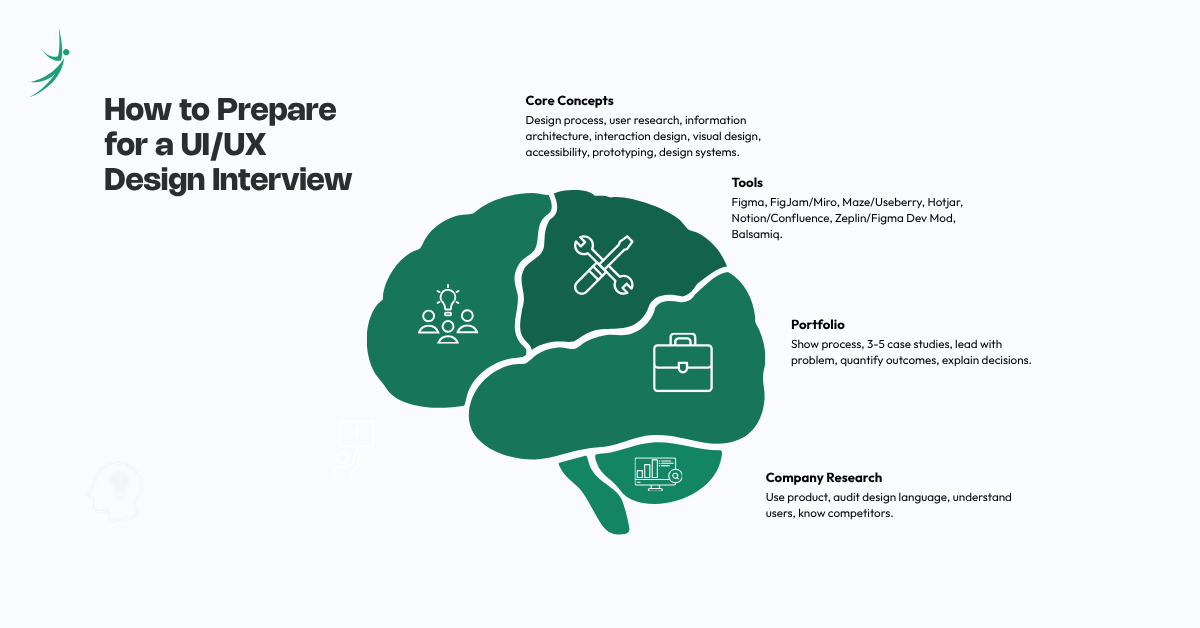
Core Concepts You Must Know
Regardless of the role you're applying for, interviewers expect fluency in:
- Design process: Research -> Define -> Ideate -> Design -> Test -> Iterate
- User research methods: Interviews, surveys, usability testing, card sorting
- Information architecture: Sitemaps, navigation structure, content hierarchy
- Interaction design: Microinteractions, affordances, feedback loops, error state
- Visual design fundamentals: Typography, color theory, grid systems, spacing
- Accessibility: WCAG standards, contrast ratios, inclusive design principles
- Prototyping: Low-fi and hi-fi, interactive prototypes in Figma
- Design systems: Components, tokens, documentation
Tools You Should Be Familiar With
You don't need to master every tool but you should explain what it does, when you'd use it, and back it up with one real example. Check this out to learn about must know UI/UX tools for designers
- Figma: Primary design and prototyping tool (know this deeply)
- FigJam / Miro: Collaborative whiteboarding, journey mapping, workshops
- Maze / Useberry: Unmoderated usability testing
- Hotjar: Heatmaps and session recordings for behavioral data
- Notion / Confluence: Design documentation and research notes
- Zeplin / Figma Dev Mod: Developer handoff and specs
- Balsamiq: Quick low-fidelity wireframing
Building and Presenting Your Portfolio
Your portfolio matters more than your CV in UI/UX interviews. A weak portfolio will cost you the job regardless of how well you answer questions.
What makes a strong UI/UX portfolio:
- Show your process, not just final screens. Interviewers want to see how you think; sketches, wireframes, research notes, and iterations are all valuable
- Include 3–5 strong case studies rather than 10 mediocre ones
- Lead with the problem, not the design. Start each case study with the business and user problem you were solving
- Quantify outcomes wherever possible; task completion rate, error reduction, time-on-task improvement
- Explain your decisions; Why did you choose this layout over alternatives? What did you test and what did you learn?
Researching the Company Before the Interview
- Use their product. Sign up, go through onboarding, and identify 2-3 UX issues and what you'd change and why
- Audit their design language; What system are they using? Is it consistent? What accessibility issues exist?
- Understand their users; B2B SaaS, consumer app, and e-commerce products have fundamentally different UX priorities
- Know their competitors name 2-3 and articulate how the company's UX differs
UI/UX Internship Interview Questions
Internship interviews focus on curiosity, design thinking, and foundational knowledge, not execution experience. Be honest about what you know and show genuine enthusiasm for learning.
Concept Understanding Questions
Q: Why do you want to work in UI/UX design?
Be specific. Reference something you noticed, a problem you tried to solve, or an app you analyzed and wanted to redesign. "I redesigned my college's website as a personal project because the navigation was confusing for new students" is stronger than "I'm passionate about design."
Q: What makes a good user interface?
A strong answer covers: clarity (users know what to do without instruction), consistency (elements behave predictably), feedback (the interface responds to user actions), accessibility (everyone can use it), and efficiency (tasks can be completed with minimal steps).
Q: Can you name an app with great UX and explain why?
Choose an app you genuinely use. Explain one or two specific design decisions, not just that it "looks nice." "Spotify's Now Playing screen prioritizes the album art and makes play/pause the largest tap target, perfect for one-handed use while walking."
Portfolio & Practical Questions
Q: Walk me through a project in your portfolio.
Use this structure: Problem -> Research -> Design decisions -> Outcome. If you're a student with limited professional experience, course projects and personal redesign exercises count, just frame them clearly.
Q: How do you decide what to design first when starting a new project?
Show that you resist jumping into Figma immediately. "First, I want to understand the users and the problem, even a 30-minute research sprint tells you more than two hours of designing blind. Once I have a clear problem statement, I explore structure through rough sketches before going digital."
Entry-Level UI/UX Design Interview Questions
At the entry level, you're expected to execute tasks independently and explain the reasoning behind your decisions.
Design Decision Questions
Q: How do you decide on a color palette for a UI?
A strong answer goes beyond aesthetics:
- Start with the brand's existing colors and guidelines
- Consider color psychology for the product's emotional goal (trust → blue, energy → orange)
- Ensure minimum 4.5:1 contrast ratio for accessibility (WCAG AA)
- Build a systematic palette: primary, secondary, neutral, semantic (success/error/warning)
- Test in context; colors look different on screens than in isolation
Q: What's your approach to designing for mobile?
Mobile-first thinking:
- Design for the smallest screen first, then scale up
- Minimum touch target size: 44×44px
- Thumb-friendly placement of primary actions (bottom of screen)
- Prioritize content ruthlessly, mobile has no room for clutter
- Test on real devices, not just browser previews
Q: How do you design error states?
Error states are often an afterthought, which is exactly why interviewers ask about them.
A good error state:
- Appears close to where the error occurred
- Explains what went wrong in plain language (not "Error 404")
- Tells the user what to do next
- Doesn't erase what the user already typed
"Don't just say the form is invalid, tell them which field, what's wrong, and how to fix it."
Process and Collaboration Questions
Q: How do you handle stakeholder feedback that conflicts with what users want?
I treat it as a signal worth understanding, not fighting. I try to find out what business needs are driving the request. Often the stakeholder's goal and the user's need aren't actually in conflict; they just look that way on the surface. If they genuinely are in conflict, I present user research data and frame the design recommendation in terms of business risk.
Q: How do you work with a developer who pushes back on your design?
I listen first. Developers often flag constraints I didn't know about, and those constraints can actually lead to better, simpler solutions. If I believe a design element is critical, I'll explain the user reason behind it and ask if we can find a feasible alternative together rather than just insisting my design gets built exactly as drawn.
Senior / Advanced UI/UX Interview Questions
Senior roles test strategic thinking, systems-level design, leadership, and business impact. Vague answers here will cost you the offer.
Systems & Strategy Questions
Q: How do you build and maintain a design system?
A complete answer covers:
- Audit first: inventory existing UI patterns to find inconsistencies before building
- Define design tokens: color, typography, spacing, border radius, shadows
- Build components: atoms (buttons, inputs) → molecules (form fields) → organisms (navigation, cards)
- Document everything: usage guidelines, do/don't examples, accessibility notes
- Governance: decide who can modify components, how changes are versioned, how teams are notified
- Adoption: a design system only works if teams use it; treat adoption like a product launch
Q: How do you measure the impact of UX design?
Senior designers are expected to connect design to business outcomes:
- Usability metrics: Task success rate, time-on-task, error rate, System Usability Scale (SUS) score
- Behavioral metrics: Retention, engagement depth, feature adoption, session length
- Business metrics: Conversion rate, churn reduction, support ticket volume, NPS
- Leading indicators: Onboarding completion, activation rate
"After redesigning our onboarding flow, task completion went from 54% to 78%, which correlated with a 12% increase in 30-day retention. That's the kind of outcome I track."
Q: How do you design for scale?
“Designing for scale means making decisions that work for 10 users and 10 million users without fundamentally breaking. That means designing systems, not screens; building patterns that can handle edge cases like empty states, overflowing content, different language lengths, and varying data densities. It also means documenting decisions clearly so other designers can extend the system without inconsistency.”
Leadership & Process Questions
Q: How do you influence product decisions as a designer?
“By speaking the language of the people in the room. With engineers, I talk about feasibility and edge cases. With product managers, I frame design recommendations in terms of user retention and conversion. With executives, I connect design to revenue and brand trust. I use research to back up recommendations; opinions get debated, data gets acted on.”
Q: Describe a time your design failed. What did you learn?
Interviewers ask this to assess self-awareness and growth mindset. Don't dodge it.
“I designed an onboarding flow that I was confident in, we'd done competitive analysis and the visual design was strong. But we hadn't run a single usability test before launch. The completion rate was 41%. When we ran tests post-launch, users were confused by step 3, something that would have been obvious in a 30-minute test. The lesson: no usability test is too small. I now treat testing as non-negotiable, even with a three-day timeline.”
UI/UX Interview Tips: What Interviewers Are Really Looking For
Some ui/ux interview tips:
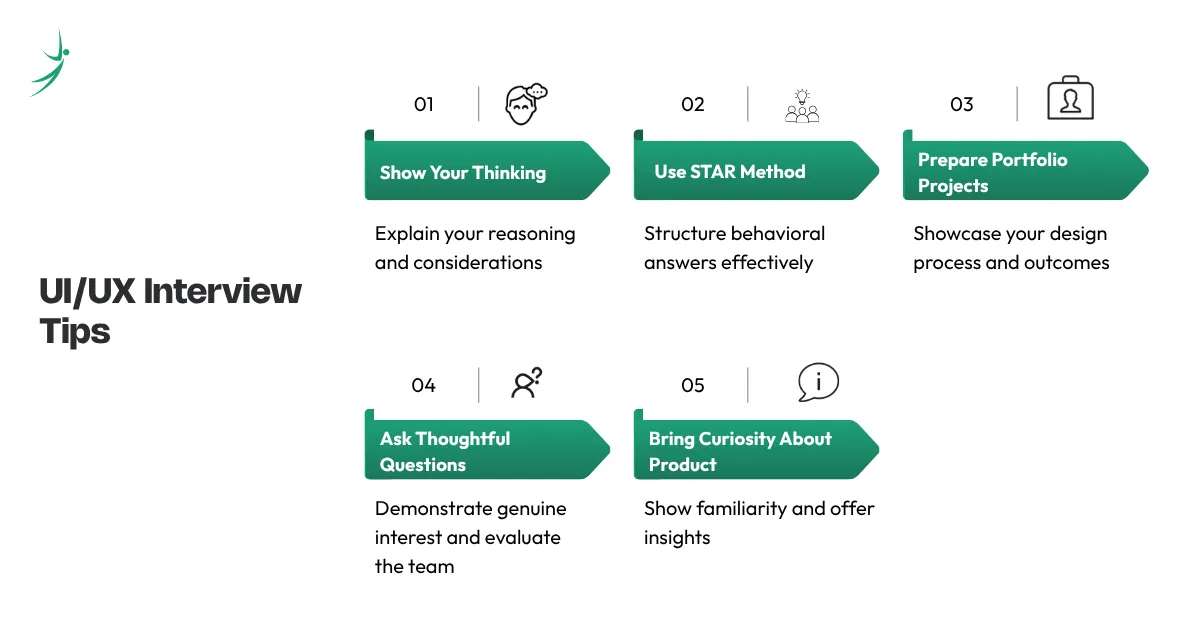
1. Show Your Thinking, Not Just Your Answers
The best UI/UX interview answers reveal how you think, not just what you know. Walk interviewers through your reasoning. Explain tradeoffs. Show that you can hold multiple considerations at once: user needs, technical constraints, business goals, and accessibility.
2. Use the STAR Method for Behavioral Questions
For every behavioral question ("Tell me about a time when..."), structure your answer as:
- Situation: Context and background
- Task: What you were responsible for
- Action: Exactly what you did
- Result: Measurable outcome
3. Have Three Portfolio Projects Ready
Know each project inside out; the problem, your process, what you tested, what failed, what you changed, and the final outcome. If you're still building your portfolio, a UI/UX design course gives you real guided projects you can walk through confidently.
4. Ask Thoughtful Questions
Strong candidates ask:
- "What does a successful first 90 days look like in this role?"
- "How does design currently influence product decisions here?"
- "What's the biggest UX challenge the team is working on right now?"
Questions signal genuine interest and help you evaluate whether the team is actually design-led.
5. Bring Curiosity About Their Product
Don't show up without having used or audited the product you'd be designing for. Come with one observation, something you noticed, something you'd improve and the reasoning behind it.
Here are all three sections rewritten in short, punchy points:
UI/UX Interview Preparation Checklist
1. Portfolio
- 3-5 case studies ready; problem, process, and outcome
- Shows research, wireframes, and final designs, not just final screens
- At least one project has a measurable result
- Accessible via a shareable link
- Can walk through every project confidently without notes
- All images and links load correctly
2. Knowledge
- Can explain your design process end-to-end
- Know UX vs UI, wireframe vs prototype, usability vs accessibility
- Familiar with WCAG 2.1 AA accessibility standards
- Can explain 3+ Gestalt principles with examples
- Know what a design system is and how to use one
- Can measure UX impact; task success rate, SUS score, retention
3. Tools
- Comfortable with Figma; components, auto layout, prototyping, dev mode
- Know at least one research tool (Maze, Hotjar, Google Forms)
- Can explain your developer handoff process
- Familiar with FigJam or Miro for collaboration
4. Company Research
- Used or audited the company's actual product
- Have 1-2 UX observations ready with reasoning
- Know who their users are and what problem they're solving
- Can name 2-3 competitors and how the UX differs
5. Interview Readiness
- 3 project walkthroughs ready in STAR format
- Clear answers for "Why UI/UX?" and "Why this company?"
- Real example of handling feedback, conflict, or failure
- 3–4 thoughtful questions ready to ask the interviewer
- Practiced answers out loud, not just in your head
Interview Success Tips
- Show your process; thinking matters more than final screens
- Use specific numbers; completion rates, error reduction, retention improvements
- Ask questions; treat the interview as a two-way conversation
- Admit what you don't know; then show how you'd find out
- Connect decisions to both user needs and business goals
- Think out loud during design exercises; interviewers evaluate your reasoning
- Address edge cases; empty states, errors, loading states
- Send a follow-up thank-you; within 24 hours
Interview Mistakes to Avoid
- Don't show only final screens; show the messy middle too
- Don't go silent during whiteboard or design challenges
- Don't get defensive when your work is challenged; stay curious, not protective
- Don't skip edge cases; error states and empty states reveal seniority
- Don't claim skills you can't back up; expect to demonstrate anything on your CV
- Don't jump to solutions; always ask who, what, and why before opening Figma
- Don't overclaim experience; honest and coachable beats impressive and bluffing
Conclusion
A UI/UX interview isn't just about what you know, it's about how you think, communicate, and solve problems under pressure. Show your process, speak in specifics, and always connect your design decisions to real user needs. Whether you're just starting out or leveling up to a senior role, preparation and real project experience are what separate candidates who get hired from those who don't. If you're still building your portfolio and skills, Skill Shikshya's UI/UX Design Diploma Course gives you hands-on Figma training, real case studies, and guaranteed internship support for everything you need to walk into your next interview with confidence.
Frequently Asked Questions
What do interviewers look for the most in a UI/UX interview?
How many projects should I have in my design portfolio?
Do I need to learn how to code to get a UI/UX job?
What is the easiest way to explain the difference between UI and UX?
How do I handle a live design challenge if I get stuck?
What is "accessibility" in web design, and why does it matter?
About Author: