UI UX Skills - Complete Guide for Beginners
UI UX skills are what separate someone who appreciates good design from someone who can actually create it. Whether you are a student deciding which UI UX design course to take, a professional switching from a different field, or someone building their first portfolio project, knowing which UI UX skills are needed and in what order to build them determines how fast your career moves.
The UI UX meaning comes directly from the full form: User Interface and User Experience. So do the skills. Visual design, typography, and UI UX tools sit on the UI side. User research, wireframing, and usability testing sit on the UX side. The ui vs ux distinction matters when planning your learning but in practice, employers hire for both, and the best designers develop both. If you are getting started into UI UX and want the broader picture before focusing on specific UI UX skills.
The UI UX skills needed in 2026 go well beyond knowing how to use Figma. Companies hiring today expect designers to think with research behind them, communicate clearly with developers and product managers, and work with AI tools without losing design judgment. The overall ui ux experience a product delivers depends entirely on how strong these skills are in the team building it. If you want to develop these UI UX skills in a structured, project-based environment, our UI UX design course in Nepal at Skill Shikshya is built for exactly that.
Why UI UX Skills Matter in 2026
The demand for UI UX skills in Nepal and globally has never been more concrete. LinkedIn's 2024 Jobs on the Rise report listed UX design among the top 10 fastest-growing roles across Asia. As more businesses move their products online, the professionals who can make those products usable become some of the most valued people on any tech team.
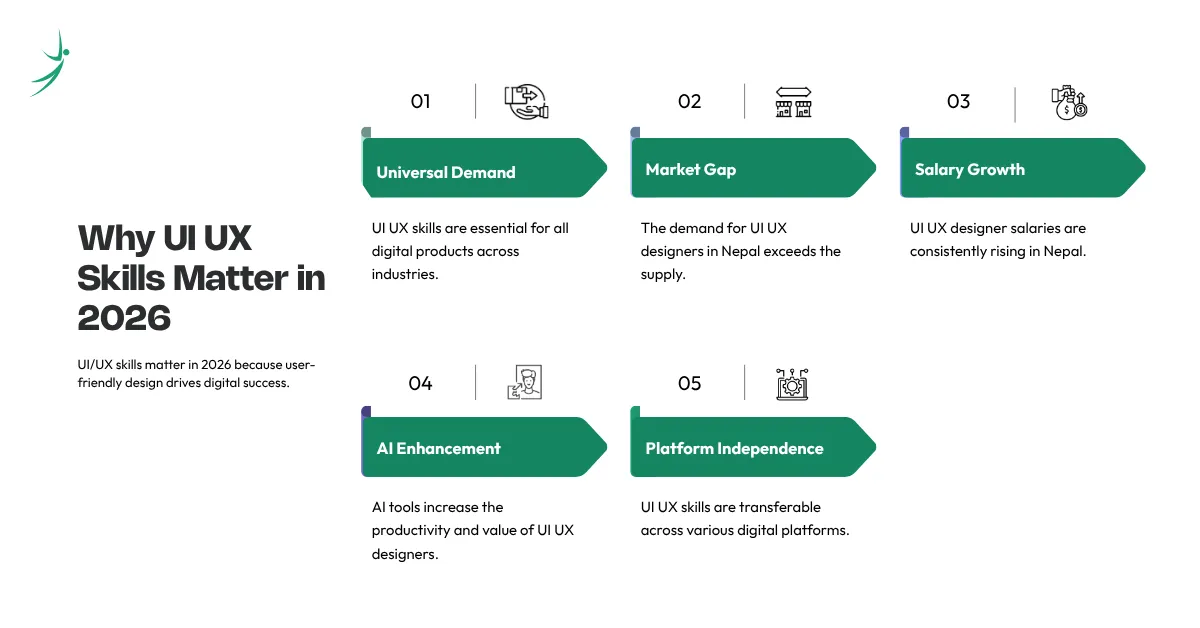
Here is why building UI UX skills in 2026 is one of the strongest career decisions you can make:
- Every Digital Product Needs These Skills: UI UX skills are not sector-specific. They are product-specific and every business now has a product. From a startup in Kathmandu building its first mobile app to an established bank redesigning its internet banking portal, UI UX work is required everywhere. That cross-industry demand means your UI UX skills transfer across sectors in a way that most technical abilities do not.
- The Nepal Market Is Hiring Faster Than It Is Training: UI UX design in Nepal is maturing quickly, but the gap between available talent and open roles remains wide. Active job listings on Merojob and LinkedIn Nepal show consistent, year-on-year growth in UI UX designer jobs in Nepal particularly for mid-level roles where designers with one to two years of portfolio-backed experience are in short supply. UI UX skills in Nepal are genuinely undersupplied, which works directly in your favour if you build them properly. For the full picture, read our guide on the scope of UI UX.
- UI UX Designer Salary Is Rising at Every Level: As businesses have come to understand the direct connection between good design and user retention, UI UX designer salary in Nepal has risen consistently. Entry-level roles now start meaningfully higher than they did three years ago, and mid-senior designers with strong UI UX skills are regularly commanding rates that rival software developers. Our complete guide on UI UX designer salary in Nepal covers what each experience level realistically earns.
- AI Is Making Strong UI UX Skills More Valuable: UI UX AI tools like ChatGPT, Claude, and Gemini have changed the daily workflow but they have raised the floor for what designers are expected to produce, not lowered it. Professionals with strong UI UX skills who also know how to use UI UX for ChatGPT prompting, UI UX for Claude-assisted handoff notes, and UI UX for Gemini research workflows are more productive and more hireable than those who do not. The skill remains human. The tools just help you move faster.
- UI UX Skills Stay Relevant Regardless of Platform: Whether the next dominant interface is mobile, desktop, voice, or AR, someone needs to design how users move through it. UI UX skills built around understanding users, testing assumptions, and communicating design decisions transfer across every medium. That is a rare quality in a technical skill set.
Core Technical UI UX Skills Every Designer Needs
The UI UX skills list below is the technical foundation every working designer needs. These are not the nice-to-have additions they are what employers check first when reviewing a UI UX designer portfolio or shortlisting candidates for UI UX jobs. For a deeper look at how these skills connect to real design work, our complete guide on what is UI UX covers the field in full.
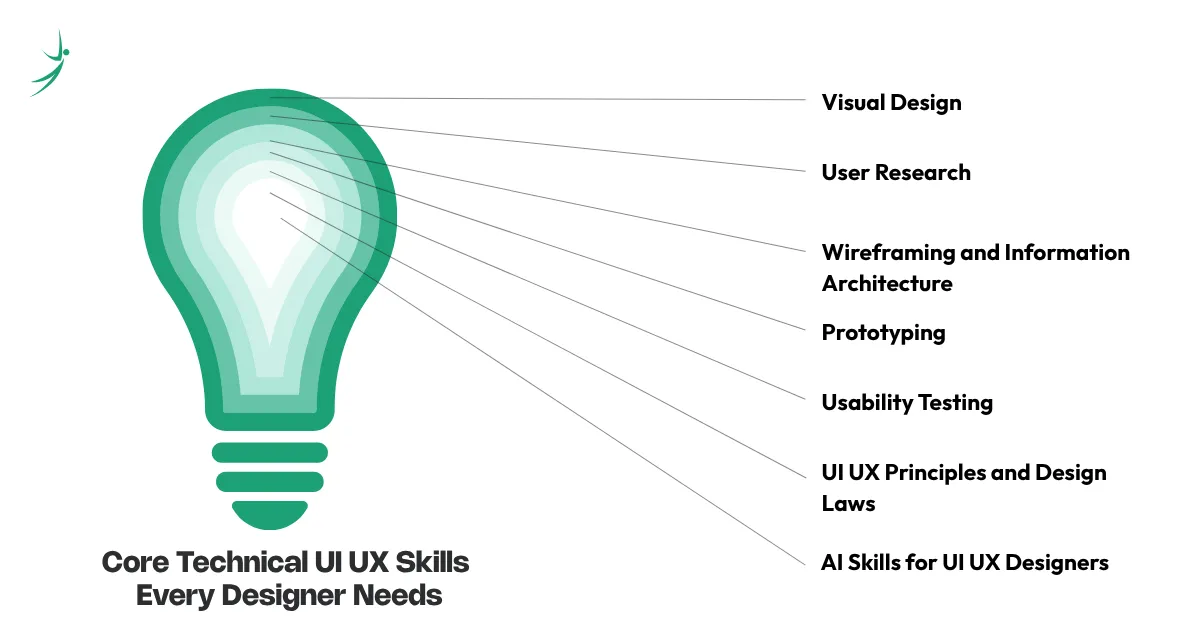
Core technical UI UX skills: visual design, user research, wireframing, prototyping, usability testing, design laws, and AI workflows
1. Visual Design
Everything a user sees on screen is visual design. Color, typography, spacing, UI UX hierarchy, iconography, button states, and layout these are all visual design decisions, and they communicate intent before a user reads a single word.
Strong visual design UI UX skills mean knowing how to build and maintain design systems, apply UI UX graphic design principles to digital screens, and produce high-fidelity work that is aesthetically consistent and functionally clear. The ui vs ux split is clearest here: visual design is the UI side of the skill set, and it is what most people think of first when they picture the job.
Tools to learn:
- Figma
- Adobe XD
- Sketch
- Adobe Illustrator
Why employers check this first: Visual design is what users judge before they interact with anything. A product with weak visual design loses user trust immediately before the first tap or click. Getting UI UX hierarchy, contrast, and spacing right is the difference between a professional output and an amateur one.
2. User Research
Of all the UI UX skills on this list, user research is the one most self-taught designers skip and the one that most consistently separates good designers from great ones. It is the practice of understanding who your users are, what they actually need, where they struggle, and why they behave the way they do.
User research UI UX skills include planning and conducting user interviews, building and analyzing surveys, running contextual inquiry sessions, and synthesizing messy findings into a clear design direction. Every strong UI UX case study starts here with evidence, not assumptions.
Tools to learn:
- Maze
- Useberry
- Typeform
- Notion
- Miro
The practical edge: Design without research is guesswork. The most common reason digital products fail is not poor visual execution it is solving the wrong problem. Research prevents that. And in UI UX interview questions, it is what separates candidates who can explain their decisions from those who cannot.
3. Wireframing and Information Architecture
Before any color, font, or interaction is decided, a designer needs to answer: what goes on this screen, and where? Wireframing is the practice of sketching out screen structure before visual design is applied. Information architecture is the broader discipline of organizing content and navigation so users can find what they need without effort.
These UI UX skills let you move fast from a research insight or a brief to a clear structural layout whether in paper sketches, low-fidelity Figma frames, or annotated flow diagrams. Wireframes are also the most efficient way to align with developers and product managers early, before any visual design investment is made.
Tools to learn:
- Figma
- Balsamiq
- FigJam
- Whimsical
What this means for your career: Designers who wireframe well catch problems early. Those who do not discover them after developers have already built the wrong thing. Strong wireframing UI UX skills also make the design handoff significantly cleaner which developers notice and remember.
4. Prototyping
Knowing how to build a clickable, testable version of your design without writing a line of code is one of the most practically useful UI UX skills you can develop. Prototypes simulate how a product will behave, letting you test flows, interactions, and user journeys before development begins.
Prototyping UI UX skills range from simple click-through mockups in Figma to complex, animated interactions in Protopie or Framer. The more realistic your prototype, the more useful feedback you get from testing and the more impressive your UI UX designer portfolio becomes when a recruiter can click through a working design rather than just look at static screens.
Tools to learn:
- Figma (primary)
- Protopie
- Framer
- InVision
Why it opens doors: A static screen does not tell you whether a flow actually works. A prototype does. For UI UX entry level jobs, a portfolio with live prototypes consistently outperforms one with only screenshots even if the visual design quality is similar.
5. Usability Testing
Most designers learn to create. Fewer learn to test. UI UX testing is the practice of watching real users interact with your designs to find where they get confused, stuck, or frustrated and then fixing it before launch.
Strong usability testing UI UX skills include planning test scripts, recruiting representative participants, running both moderated and unmoderated sessions, analyzing behavioral data, and presenting findings as clear design recommendations. This is the skill that closes the loop between what you designed and what users actually experience.
Tools to learn:
- Maze
- Lookback
- UserTesting
- Hotjar
The real-world impact: Companies that test before shipping spend less fixing things after launch. And for designers, usability testing turns a "this is what I built" case study into a "this is the problem I found and how I fixed it" case study which is infinitely more compelling to recruiters.
6. UI UX Principles and Design Laws
UI UX principles and UI UX laws are the cognitive science behind design decisions. They explain why certain layouts feel natural and others feel confusing and they give you a defensible, evidence-based reason for every choice you make.
Every designer working on serious UI UX projects should know these:
- Hick's Law: More choices slow decision-making. Reduce options wherever the user has to decide.
- Fitts's Law: The larger and closer a target, the easier it is to click or tap. Size and placement matter.
- The Law of Proximity: Elements placed close together are perceived as related. Spacing communicates meaning.
- Miller's Law: People hold roughly seven items in short-term memory. Chunk information accordingly.
- Jakob's Law: Users spend most of their time on other products. Match existing mental models rather than fighting them.
- The Aesthetic-Usability Effect: Users perceive visually appealing designs as easier to use, even when they are not.
Why you need these first: When a developer, product manager, or client challenges a design decision, the answer cannot be "it looks better." These UI UX principles give you a factual, testable reason for every layout choice. Designers who can cite these laws in UI UX interview questions immediately stand out from those who cannot.
7. AI Skills for UI UX Designers
AI has changed the daily workflow of UI UX design more in the last two years than any other development in the previous decade. UI UX using AI is now a professional expectation in forward-thinking studios and agencies not a future consideration.
The specific AI UI UX skills every designer needs to build:
- UI UX for ChatGPT: Generating user personas, writing UX microcopy, building research scripts, drafting content for wireframe placeholders, and creating onboarding flow copy at speed
- UI UX for Claude: Reviewing design decisions for logical consistency, generating accessibility feedback, writing detailed developer handoff notes, and structuring UX documentation
- UI UX for Gemini: Researching user behavior patterns across markets, summarizing competitive analysis, generating structured content for complex multi-step flows
- UI UX design AI tools: Galileo AI for rapid screen layout generation from text prompts, Uizard for converting rough sketches into digital wireframes, Khroma for AI-trained color palette generation
A related specialization worth noting: designers who combine strong UI UX skills with front-end coding ability are increasingly hired as UI UX engineers one of the highest-paid roles in the field, and one where AI coding tools like GitHub Copilot have significantly lowered the barrier to entry.
Why UI UX hiring is changing around this: AI does not replace UI UX skills it raises expectations for how much a single designer can produce. Studios that used to need three designers for a project now expect two to deliver the same output. Designers with strong AI UI UX skills are the two who remain in the room.
Soft Skills for UI UX Designers
Technical UI UX skills get you hired. Soft skills determine how far you go. The soft skills for UI UX work are what separate professionals who produce deliverables from those who shape products, lead projects, and earn trust from both their teams and their clients.
Most UI UX courses focus entirely on tools and process. But experienced hiring managers consistently rank soft skills alongside technical ability when evaluating candidates especially for roles beyond intern and entry level.
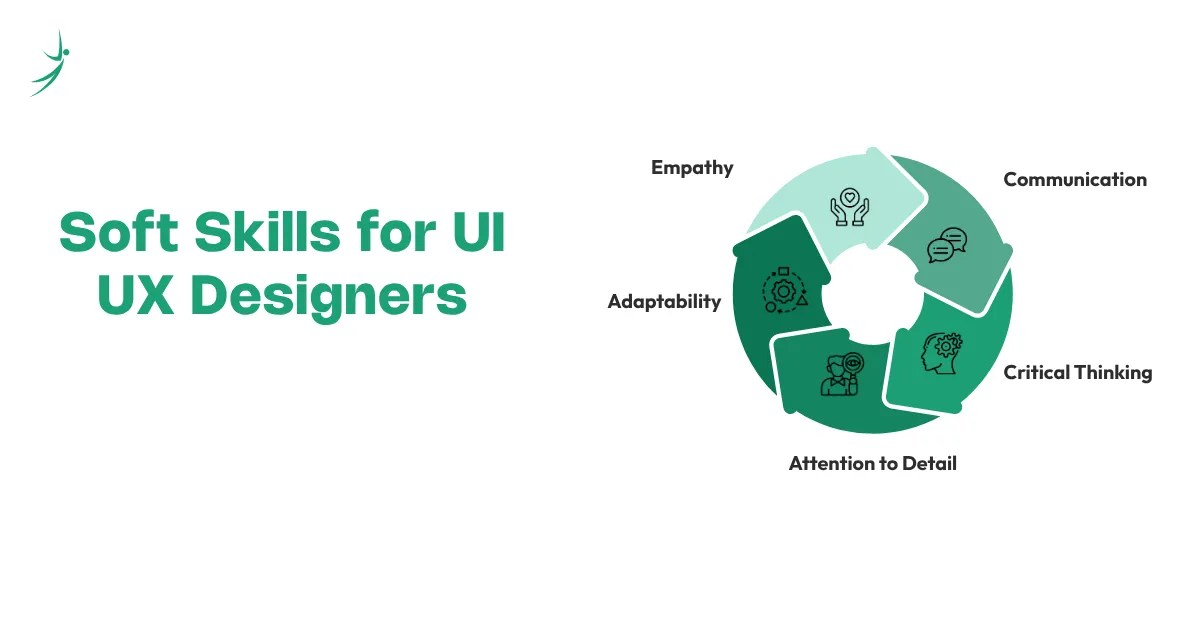
Soft skills for UI UX designers: empathy, communication, critical thinking, attention to detail, and adaptability
1. Empathy
Empathy is the UI UX skill that makes every other skill more effective. It is the ability to step outside your own assumptions and genuinely understand what a first-time user feels when they encounter your design the confusion, the hesitation, the moment something clicks.
Without it, user research becomes data collection without meaning. Prototypes become artifacts rather than questions. And usability tests become confirmation of what you already believe rather than genuine discovery.
How to build this UI UX skill: Sit next to someone who has never seen your design and watch them use it without guiding them. Do this once a week on any project, however small. The discomfort of watching confusion is the fastest teacher you will find.
2. Communication
Every UI UX project involves at least three conversations: one with the user (through research), one with the team (through presentations and handoffs), and one with the client or stakeholder (through rationale and documentation). Weak communication breaks all three.
Strong communication UI UX skills mean writing clear UI UX notes in Figma handoff files that developers can follow without asking questions, presenting design decisions with evidence rather than opinion, and explaining research findings in language that non-designers understand and act on. In Nepal's market, designers who communicate clearly in both English and Nepali have a measurable advantage in both agency and in-house roles.
How to build this UI UX skill: After every design decision you make, write one sentence that explains why in plain language, not design jargon. Do this throughout every project. Within a month, your communication clarity will be noticeably stronger.
3. Critical Thinking
The ability to question your own design before a user does is what separates designers who improve from those who repeat the same mistakes. Critical thinking in UI UX work means reviewing what you have created with the same skepticism you would apply to a competitor's product.
This is also the UI UX skill that makes feedback sessions productive rather than defensive. Designers who can critically evaluate their own UI UX projects in front of a team naming what worked, what did not, and what they would change earn trust far faster than those who cannot.
How to build this UI UX skill: Document your design decisions as you make them. Come back to any project after five days away and audit it as a first-time user. The gap between what you assumed and what you find is where your critical thinking develops.
4. Attention to Detail
Misaligned elements, inconsistent spacing, wrong font weights, missing hover states these are the details that make a design feel unfinished. Individually they seem minor. Together they create a product that erodes user confidence without the user knowing exactly why.
Attention to detail as a UI UX skill is not about perfectionism it is about consistency at scale. A design system helps, but it only works if the designer applying it is checking that every component is used correctly, every interactive state is accounted for, and every screen follows the same rules as every other screen.
How to build this UI UX skill: Before marking any design as complete, audit it in four passes: spacing and alignment, typography consistency, color application, and interactive states. Build this into your process as a non-negotiable final step on every UI UX project.
5. Adaptability
UI UX updates arrive constantly. Tools change. Platform guidelines shift. AI introduces new workflows every quarter. Designers who treat learning as something that ended when they finished a course will be outpaced within two years by those who did not.
Adaptability as a UI UX skill means staying genuinely current with UI UX resources from Nielsen Norman Group, Smashing Magazine, and UX Collective, experimenting with new tools before being asked to, and approaching every change in the field as a skill-building opportunity rather than a disruption.
How to build this UI UX skill: Set aside ninety minutes every week to explore one new tool, article, or technique. It does not need to be immediately relevant to your current project. The habit of consistent, self-directed UI UX learning is what keeps your skills sharp over a full career not just during the first year.
Most In-Demand UI UX Skills in Nepal
Nepal's UI UX design market has its own priorities. While global skill trends provide the foundation, knowing specifically which UI UX skills in Nepal employers are actively hiring for gives you a practical advantage when building your career locally. Here is what active job listings, agency requirements, and UI UX studio hiring patterns in Nepal currently show:
Most in-demand UI UX skills in Nepal: Figma, UI UX website design, user research, AI-assisted workflows, and portfolio case studies
- Figma Proficiency Non-Negotiable Baselin: Figma is the tool listed in almost every UI UX designer job in Nepal posting, from junior intern roles to senior positions. Most agencies, product companies, and UI UX studios have moved entirely to Figma for design, prototyping, and developer handoff. Proficiency here is the minimum not the differentiator.
- UI UX Website Design and Mobile UI Highest Volume Demand: The majority of UI UX work available in Nepal involves UI UX of website products, mobile application interfaces, and e-commerce platforms. Designers who handle responsive UI UX website design confidently and understand mobile-first layout decisions are in the highest demand across both direct client work and agency projects.
- User Research Growing Fast: Nepal's market is maturing beyond pure visual output. More clients and product teams are asking for research behind design decisions not just screens. Designers who can conduct proper user interviews and synthesize findings into UI UX case study documentation are differentiating themselves clearly from those who only deliver visual deliverables.
- AI-Assisted Design Workflows Premium Skil: Designers in Nepal who use AI tools actively within their design process are being hired faster and at higher rates. The gap between designers who use UI UX design AI tools and those who do not is visible in speed, output volume, and the quality of early-stage deliverables. This is moving quickly from a premium skill to a standard expectation.
- Portfolio Quality and Presentation Universal Requirement: Every UI UX internship in Nepal application, every entry-level role, and every senior position requires a portfolio. But Nepal's more competitive hiring environments now distinguish between portfolios that show screens and portfolios that show thinking. Documented UI UX case study work with research context, process steps, and outcome is what separates shortlisted candidates from the rest.
| UI UX Skill | Demand Level | Earning Potential |
| Figma / Visual Design | Very High | Strong |
| UI UX Website Design | Very High | Moderate to Strong |
| User Research | High and Growing | Strong |
| AI-Assisted Design | Rapidly Growing | Premium |
| Usability Testing | Growing | Strong |
| Portfolio Case Studies | Universal Requirement | Directly impacts salary |
For detailed salary figures by role and experience level, read our full guide on UI UX designer salary in Nepal.
How to Build Your UI UX Skills
Knowing which UI UX skills you need is the first step. Knowing how to build them efficiently without spending months on the wrong resources in the wrong order is what actually moves your career forward.
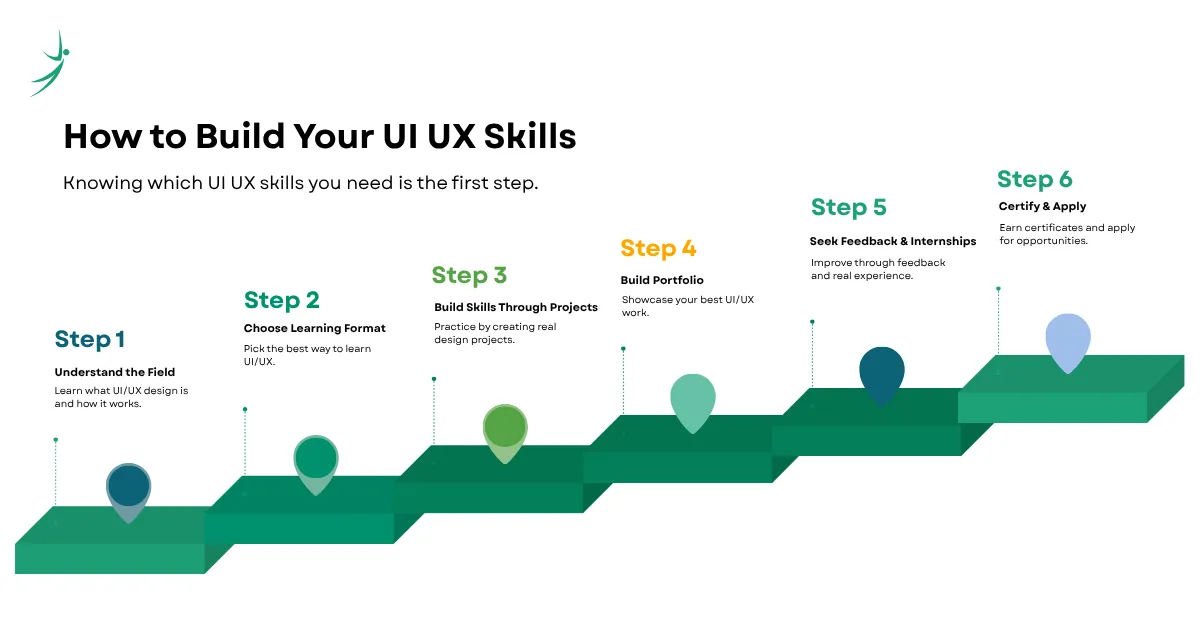
- Step 1: Understand the Field Before You Specialise: Before focusing on individual UI UX skills, understand what the field is actually about. Read our complete guide on what is UI UX, then follow the UI UX roadmap to see exactly what to learn, in what order, and how each skill connects to the next. Starting without this context leads to patchy knowledge that breaks down in real projects and UI UX interview questions.
- Step 2: Choose the Right Learning Format for Your Situation: There are three realistic paths for building UI UX skills:
- UI UX free course options: Google's UX Design Certificate on Coursera, Interaction Design Foundation's curriculum, and YouTube channels like AJ&Smart and Design Course cover the fundamentals. Good for exploring the field before committing.
- UI UX course online: Platforms like Interaction Design Foundation and Career Foundry offer structured, mentor-supported programs with community access. Better for building complete skill sets systematically.
- UI UX design course in Nepal: An in-person or hybrid UI UX course in Nepal with hands-on project feedback, industry-relevant curriculum, and career placement support gives the most direct path to employment. Before enrolling anywhere, review the UI UX course fees and check exactly what each program includes.
- Step 3: Build Every UI UX Skill Through Real Projects Immediately: Do not learn Figma through tutorials alone. Build something with it the same week. Take a local app or website you use regularly and redesign one screen. Document what you changed and why. Every UI UX skill on this list becomes real only when applied to an actual problem not when completed on a tutorial task designed to have no friction.
- Step 4: Build Your Portfolio While You Learn: Your UI UX portfolio is the most important career asset you will develop. Start it from your first project not after you finish a course. Every UI UX project you complete, even during structured UI UX learning, can become a portfolio case study if you document your process, decisions, and outcomes clearly. A strong UI UX designer portfolio with three well-presented case studies will outperform a certificate from any institution in a hiring conversation.
- Step 5: Apply for Feedback and Internships Early: Share your work in design communities Dribble, Behance, and Nepal-based LinkedIn groups. Apply for a UI UX internship in Nepal while you are still building skills. UI UX interview questions for freshers focus on your thinking process, not perfection. Hiring managers know you are at the start. What they are looking for is evidence that you think like a designer that you can identify a problem, make a decision, and explain it clearly.
- Step 6: Certify, Apply, and Keep Building: Combine your UI UX portfolio with certifications from Google, IDF, or your course provider. Then apply actively for UI UX jobs, UI UX designer jobs in Nepal, and remote positions. Most UI UX entry level jobs do not require a UI UX bachelor's degree. What they require is demonstrated ability. The portfolio is the degree.
Frequently Asked Questions
What are the most important UI UX skills to learn first?
What is the complete UI UX skills list for beginners?
What are the most in-demand UI UX skills in Nepal right now?
How long does it take to build job-ready UI UX skills?
Can I learn UI UX skills for free?
What UI UX skills do I need for a career in Nepal specifically?
Do I need a degree to get a UI UX job?
About Author: