How to Use ChatGPT for Content Writing Effectively?
ChatGPT - one of the famous AI chatbots was released by tech giant OpenAI back in November, 2022. Millions around the world use it for different purposes. According to a study, 75% of ChatGPT users use it for three prominent tasks. These include practical guidance, information retrieval, and content writing assistance.
ChatGPT stats from WytLabs mention that 24% people use this AI chatbot for writing purposes. The reason behind this is that writing good content is not an ordinary task. It requires a combination of various skills, i.e., research, reading, idea crafting, etc.
How Are People Using ChatGPT Wrong?
There is no doubt that ChatGPT has given a boost to content writing. But many people are not using it the right way. Especially those who are in the online content industry. There’s always a hot talk about whether they should use ChatGPT content. Will search engines like Google rank ChatGPT content?
Google itself has clarified that it only needs helpful content. It does not care how the content is being written. That means you can use ChatGPT content, but not the copy-paste thing. You have to use it strategically.
Effective Way to Use ChatGPT for Content Writing
A mistake that many people make is that they completely rely on ChatGPT's written content. The most effective and expert suggested way of using ChatGPT is to use it as a helpful assistant, not a replacement.
Set your requirements
While writing content using ChatGPT, a common mistake made by many people is getting the job done in a short command. We have seen many people just pasting a topic into GPT and asking it to generate a 1000-word article. If you are doing that too, know that this approach is totally wrong.
A better approach is to move step by step and make use of detailed prompts. Below, we have shared a flow that can get you better results.
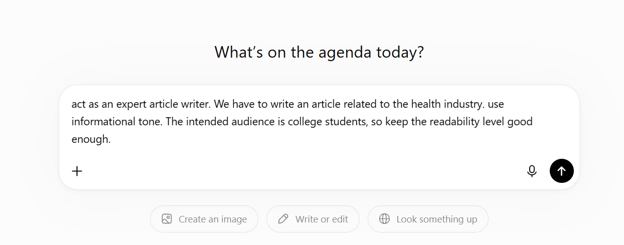
Start giving prompts to ChatGPT by telling it what industry expert bot it should act as, and what role it should play. Then tell it your requirements, like the tone of the content and the intended audience.
For example, if you are planning to write an article, you can run a prompt like the one inside the screenshot attached.
Create an outline
Now GPT has entered your desired mode. To proceed with writing your article, ask ChatGPT to create an outline for the topic within the same chat. Don’t just give it a topic and ask to generate one. Instead, give it a detailed prompt like in the screenshot below.
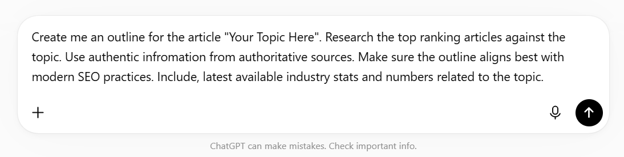
That’s how you can generate a good article outline from ChatGPT.
Generate a draft
Now that you have the outline within the same chat, tell GPT to write you the full article. But again, tell in detail about the requirements it should follow while writing your article.
For example:
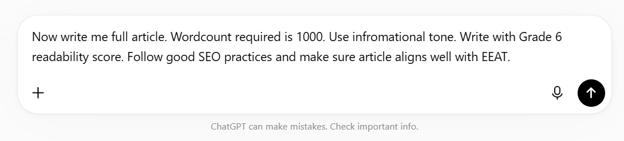
Once you run this command, GPT will write for you accordingly. You can also ask GPT to write content section by section. In fact, asking to generate your content section by section can get you better results.
Caution: Do not use that content as it is. Because the real game starts now.
Edit, rewrite, & fact check
Once you have the content written by ChatGPT, you have to edit, rewrite, and fact-check. Why do that?
You should do that because ChatGPT is an AI bot trained on existing content. It can make mistakes; in fact, many of the times it does make mistakes like providing outdated information.
Another reason is a predictable pattern that gets content flagged as AI-written. Because no matter how good your command is, most of the time you will get robotic results. To remove that, a better approach is to humanize the text using ChatGPT humanizer. Doing this will break the AI pattern and also remove AI detection from your content.
Even after humanizing the text, you should review it and run a human eye. Because depending fully on machines is a foolish thing.
Proofread
The final step is proofreading. Read the content carefully before publishing it. Look for:
- Spelling mistakes
- Grammar and punctuation errors
- Plagiarism
- Content readability
Also, check if the content flows well from one section to another.
Final Talk
Many people think ChatGPT can do all the work for them. In reality, the best results come when you stay involved in the process. Use it to save time, generate ideas, and overcome writer's block.
However, always add your own thinking, knowledge, and review. That is what turns average content into valuable content.
Frequently Asked Questions
Does Google penalize AI-generated content?
Should I write a whole article with one prompt?
Do I need to edit ChatGPT content?
About Author: